
Problem Statement: If you are coming from Oracle EBS background, you will be surprised to find out there isn’t a single way to PUSH the data out from Oracle HCM (like EBS business events). Yes, there is Atom feeds but that’s for another topic. During our HCM implementation, we have to re-architect our current integrations that sync data from EBS HRMS to other 3rd party systems such as Concur, Kronos, …etc.
How: We created these HCM Extracts (some in XML format to call 3rd Party APIs, while other are csv or pipe delimited files). If we don’t use SOAP Service, this is how we probably will have to do.
Create a schedule-based HCM extract job in Oracle HCM, then create OIC schedule-based integration that will pick up the “file” generated by the extract in UCM server. As you could probably imagine it will be a nightmare to maintain two different schedules for a single integration. (Imagine that x20)
This is where HCM SOAP Service come into play.
Within Oracle Integration Cloud (OIC), I’m leveraging their native SOAP Adapter.

I’m calling HCM’s FlowActionsService.submitAndGetFlowInstanceId SOAP Service.


Here is the most important part of calling SOAP service to “trigger” the extract jobs to run. (Message Body)
Here is the sample body of above SOAP Endpoint Action’s mapper.
        <xsl:template match="/" xml:id="id_11">
              <nsmpr0:submitFlow xml:id="id_12">
                    <nsmpr0:flowName xml:id="id_25">
                          <xsl:value-of select="$FlowName" xml:id="id_59"/>
                    </nsmpr0:flowName>
                    <!--Zero or more repetitions:-->
                    <nsmpr0:parameterValues>
                          <ns0:ParameterName>Effective Date</ns0:ParameterName>
                          <ns0:ParameterValue>
                                <xsl:value-of select="$EffectiveDate" xml:id="id_61"/>
                          </ns0:ParameterValue>
                    </nsmpr0:parameterValues>
                    <nsmpr0:parameterValues>
                          <ns0:ParameterName>Person Number</ns0:ParameterName>
                          <ns0:ParameterValue>
                                <xsl:value-of select="$Employee_Number" xml:id="id_63"/>
                          </ns0:ParameterValue>
                    </nsmpr0:parameterValues>
                    <nsmpr0:flowInstanceName xml:id="id_26">
                          <xsl:value-of select="$flowInstanceName" xml:id="id_60"/>
                    </nsmpr0:flowInstanceName>
                    <nsmpr0:scheduledDate xml:id="id_39">
                          <xsl:value-of select="$ScheduleDateZFormat" xml:id="id_41"/>
                    </nsmpr0:scheduledDate>
                    <nsmpr0:recurringFlag xml:id="id_40">false</nsmpr0:recurringFlag>
              </nsmpr0:submitFlow>
        </xsl:template>
It is much cleaner to look at the screenshot below rather than the actual code block.
Here I’m calling FlowActionsService.submitAndGetFlowInstanceId with a few parameters at RUN TIME and other parameters are set at the beginning of Integration as Global Variable.
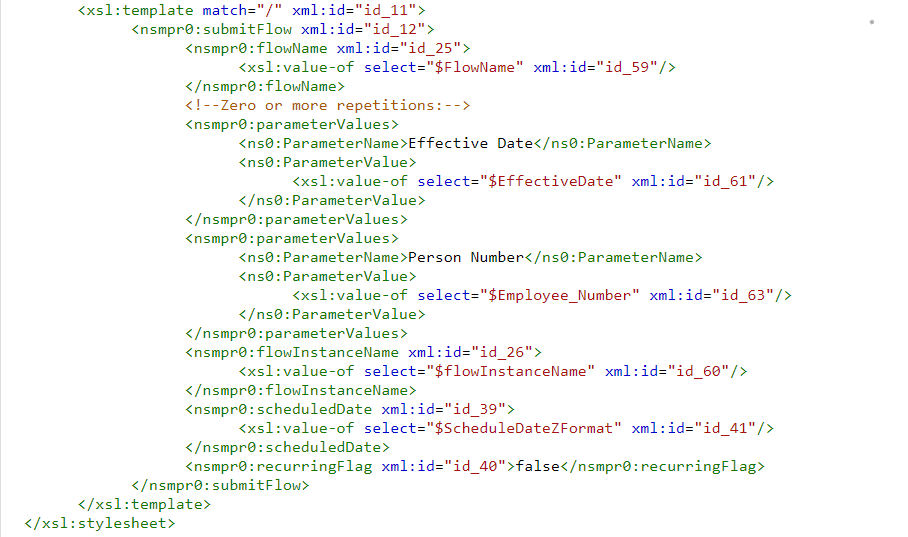
$flowInstanceName : “Extract Instance Name” on HCM web
$FlowName : “Flow Name” on HCM web
$ScheduleDateZFormat : /nssrcmpr:schedule/nssrcmpr:startTime (Integration system parameter of when this integration is run)
$Employee_Number : “Person Number” on HCM web (one of few parameters that I defined during HCM extract creation)
$EffectiveDate : “Effective Date” on HCM web (the other parameter that I defined during HCM extract creation)
This is all you really need to be able to call HCM SOAP to “run” the extract job.
(A little extra info)
If you were to ask me, now how do we get the “file” generated from HCM extract from OIC.
It will be for another topic but HCM Cloud Adapter in OIC has an option “Download HCM bulk data files from Universal Content Management (UCM)”
Keep in mind you will have capture the Document ID from above extract run job. (It’s a little more complicated than that but there are a bunch of blogs how to set Last_Process_ID in OIC)

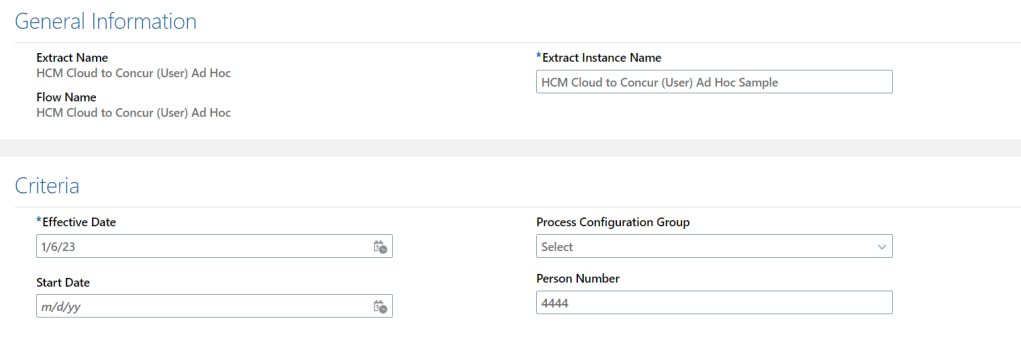
Here is what it would looks like, if I have to run the same extract from within HCM manually. (Noticed a few parameters such as Effective Date and Person Number)!
END
 Oracle Journey
Any video for this mapping
LikeLike
In near future yes, unfortunately I’ve been pretty occupied at work. How can I help?
LikeLike
hi Bo,any blog on how to set Last_Process_ID in OIC and how do we get the “file” generated from HCM extract from OIC?
LikeLike