
There is an oracle documentation for configuring ECC version 2 for 12.2.
My environment is EBS 12.2.5 and there are handful of patches required for ECC.
Start adop session then applied in this order,
Patch 28780005:R12.ATG_PF.C
Patch 28780241:R12.ATG_PF.C – Adapter patch
Product family patches
Patch 28780031:R12.FIN_PF.C – Financials
Patch 28779987:R12.PRC_PF.C – Procurement
Patch 28780037:R12.SCM_PF.C – Supply Chain Management
Additional patches
Patch 29760524:R12.BOM.D
Patch 29551003:R12.ICX.D
Patch 29551335:R12.AP.C
Patch 29359390:R12.ONT.C
Patch 29556032:R12.AR.C
Enhance performance
Patch 17361679:R12.ONT.C
Patch 19766498:R12.HZ.C
Patch 27073573:R12.INV.C
Online Help Patch
Patch 29179895 – Financials
Patch 29179889 – Procurement
Patch 29179822 – Supply Chain Management
“Special” patch for WIP – Enterprise Command Center Dataload wip-opdetails failed with ORA-01476: divisor is equal to zero
p29771950_R12.WIP.C_R12_GENERIC.zip
ECC Framework Installation
ECC Framwork Server host name – <ecc framework host>
EBS host name – <EBS host>
Download and unzip p28779983_R12_GENERIC.zip
Create a directory to use as the installation directory. Oracle recommended you created /u01 under root directory and created physical mount point or symbolic link. I choose symbolic link so that it won’t fill up root directory.
/u01/app/oracle/product
lrwxrwxrwx 1 oracle oracle 8 May 2 09:34 ecc -> /u02/ecc
chmod +x *.bsx
./EBS_ECC2.0_12.2.bsx
Navigate to $ECC_BASE/Oracle/quickInstall (ECC_BASE=/u02/ecc)
[oracle@ quickInstall]$ vi EccConfig.properties
Important reminder
jdbc syntax – jdbc:oracle:thin:@<EBS database>.FQDN:1531:TEST, it will connect using SID “TEST”
If you wish to use SERVICE_NAME –
EBS_DB_URL=”jdbc:oracle:thin:@(DESCRIPTION=(ADDRESS_LIST=(LOAD_BALANCE=YES)(FAILOVER=YES)(ADDRESS=(PROTOCOL=tcp)(HOST=)(PORT=)))(CONNECT_DATA=(SERVICE_NAME=)))”
Same for ECC_DB_URL.
Path of the ECC directory
 ECC_BASE=/u02/ecc
 Directory location of ecc-config.properties
 ECC_CONFIG_LOC=$ECC_BASE/Oracle/quickInstall/env/ecc
 Log directories for ECC and SOLR
 ECC_LOG_DIR=$ECC_BASE/Oracle/quickInstall/logs/ecc
 Ebs Middletier properties
 EBS_MIDDLETIER_HOST_FQDN=<EBS host>.FQDN
 EBS_MIDDLETIER_PORT=8010
 EBS_MIDDLETIER_PROTOCOL=http
 Ebs Middletier DB Details
 EBS_DB_URL=jdbc:oracle:thin:@<EBS database>.FQDN:1531:TEST
 EBS_DB_USERNAME=apps
 EBS_ECC_USER=ECC_DISCOVERY
 TIMEZONE=PST
 ECC DB Details
 ECC_DB_URL=jdbc:oracle:thin:@<EBS database>.FQDN:1531:TEST
 ECC_DB_USERNAME=ECC
 ECC_HOST_NAME=<ECC framework host>.FQDN
 ECC_HOST_PROTOCOL=http
 Zookeeper host url
 zkHost=localhost:2181/solr
 SECURITY_FILTER_ALLOWED_HOSTS=
 clustering mode enabled or standalone
 CLUSTER_MODE=standalone
 ECC_DATA_CACHE_SIZE=4000
 ECC_ADMIN_PORT=7775
 ECC_MANAGED_PORT=7776
 ECC_ADMIN_SSL_PORT=7777
 ECC_MANAGED_SSL_PORT=7778
 Heap Memory settings
 ADMIN_HEAP_USER_MEM=1024M
 MANAGED_HEAP_USER_MEM=2048M
 ECC_DEFAULT_LANGUAGE=en
 ECC supported languages comma separated
 ECC_LANGUAGES=en
 Dataset replication distributes complete copies of dataset index to one or more                                                                                                              other servers.
 value 1 means no replication, value 2 means the index will be exist in two serv                                                                                                             ers and so on
 DATASET_NUM_REPLICAS=
 options solr or olt
 DATASET_ANALYZER_DEFAULT=solr
 DATASET_ANALYZER_OVERRIDE_SOLR_DATASETS=
 DATASET_ANALYZER_OVERRIDE_OLT_DATASETS=
 CLUSTER_JPA_MANAGER=zookeeper
[oracle@ quickInstall]$ ./createEnvFile.sh
[oracle@quickInstall]$ ./envSetup.sh
[oracle@ quickInstall]$ ./envSetup.sh
 Select which option you want to proceed with
              1. Database Setup
              2. Install Weblogic Server
              3. Create ECC Domain
              4. Create EBS JNDI
              5. Integrate ECC with EBS
              6. Exit:
 1
 Selected ECC DB is jdbc:oracle:thin:@<EBS Database host>.FQDN:1531:TEST
 Is the user ECC existing in ECC database [y/n]? n
 Enter the database system user name: system
 Enter the database system password:
 Enter the password for ECC DB user ECC (Passwords must be at least 8 characters long):thorinoak
 Confirm the password for user ECC :
 Creating ECC…
 ECC user created successfully
 Creating ECC schema…
 ECC schema created successfully
Validation
cd /u02/ecc/Oracle/quickInstall/env
source ecc.env
[oracle@ env]$ sqlplus $ECC_DB_USER@\”$ECC_DB_CONNECTION\”
Set Up Oracle Enterprise Command Center Framework
Select which option you want to proceed with
              1. Database Setup
              2. Install Weblogic Server
              3. Create ECC Domain
              4. Create EBS JNDI
              5. Integrate ECC with EBS
              6. Exit:
 2
 Launcher log file is /tmp/OraInstall2019-05-02_10-29-18AM/launcher2019-05-02_10-29-18AM.log.
 Extracting the installer . . . . . . Done
 Checking if CPU speed is above 300 MHz.   Actual 2394.455 MHz    Passed
 Checking swap space: must be greater than 512 MB.   Actual 16383 MB    Passed
 Checking if this platform requires a 64-bit JVM.   Actual 64    Passed (64-bit not required)
 Checking temp space: must be greater than 300 MB.   Actual 108071 MB    Passed
 Preparing to launch the Oracle Universal Installer from /tmp/OraInstall2019-05-02_10-29-18AM
 Log: /tmp/OraInstall2019-05-02_10-29-18AM/install2019-05-02_10-29-18AM.log
 Copyright (c) 1996, 2017, Oracle and/or its affiliates. All rights reserved.
 Reading response file..
 Skipping Software Updates
 Starting check : CertifiedVersions
 Expected result: One of oracle-6, oracle-7, redhat-7, redhat-6, SuSE-11, SuSE-12
 Actual Result: oracle-7.6
 Check complete. The overall result of this check is: Passed
 CertifiedVersions Check: Success.
 Starting check : CheckJDKVersion
 Expected result: 1.8.0_131
 Actual Result: 1.8.0_141
 Check complete. The overall result of this check is: Passed
 CheckJDKVersion Check: Success.
 Validations are enabled for this session.
 Verifying data
 Copying Files
 Percent Complete : 10
 Percent Complete : 20
 Percent Complete : 30
 Percent Complete : 40
 Percent Complete : 50
 Percent Complete : 60
 Percent Complete : 70
 Percent Complete : 80
 Percent Complete : 90
 Percent Complete : 100
 The installation of Oracle Fusion Middleware 12c WebLogic Server and Coherence 12.2.1.3.0 completed successfully.
 Logs successfully copied to /u02/ecc/Oracle/software/oraInventory/logs.
Option 3 – Create ECC Domain
Enter the password for ECC DB user ECC :
 Enter the password for ECC admin user weblogic (Passwords must be at least 8 characters long):
 Confirm the password for ECC admin user weblogic :
 Creating ECC Domain …
 Configuring the wallet
 << read template from "/u02/ecc/Oracle/software/weblogic/templates/ecc_domain_template.jar"
        succeed: read template from "/u02/ecc/Oracle/software/weblogic/templates/ecc_domain_template.jar"
     << set config option JavaHome to "/u02/ecc/Oracle/software/java/jdk"  succeed: set config option JavaHome to "/u02/ecc/Oracle/software/java/jdk" << set config option ServerStartMode to "prod"  succeed: set config option ServerStartMode to "prod" << find Security "ecc_domain" as obj0 << find Security "ecc_domain" as obj1 << find Security "ecc_domain" as obj2 << find Security!User "ecc_domain!weblogic" as obj3  succeed: find Security!User "ecc_domain!weblogic" as obj3 << find User "weblogic" as obj4  succeed: find User "weblogic" as obj4 << set obj4 attribute Password to ""
      succeed: set obj4 attribute Password to ""
     << set obj4 attribute IsDefaultAdmin to "true"
      succeed: set obj4 attribute IsDefaultAdmin to "true"
      validateConfig "KeyStorePasswords"
      succeed: validateConfig "KeyStorePasswords"
     << write Domain to "/u02/ecc/Oracle/Middleware/user_projects/domains/ecc_domain"
     …………………………………………..
      succeed: write Domain to "/u02/ecc/Oracle/Middleware/user_projects/domains/ecc_domain"
     << close template
      succeed: close template
 ECC Domain is created…
 ECC Log directory is: /u02/ecc/Oracle/quickInstall/logs/ecc
 Updating ECC Domain with the Config properties location /u02/ecc/Oracle/quickInstall/env/ecc/ecc-config.properties
 ecc.log.path update in /u02/ecc/Oracle/quickInstall/env/ecc/ecc-config.properties successful
 zkHost.url update in /ecc-config.properties successful
 ecc.languages update in /ecc-config.properties successful
 ecc.base_language update in /ecc-config.properties successful
 dataset.analyzer.default update in /ecc-config.properties successful
 dataset.analyzer.override.solr.datasets update in /ecc-config.properties successful
 dataset.analyzer.override.olt.datasets update in /ecc-config.properties successful
 cluster.jpa.manager update in /ecc-config.properties successful
 rmi.url update in /ecc-config.properties successful
 Starting ECC high availability configuation script.
 Configuring ECC in single mode.
 zookeeper numbers 1
 updating dataset.num.replicas=1
 dataset.num.replicas update in /ecc-config.properties successful
 eccConfigLocation jvm property configured for eccManaged Server
 Configuring WLS servers ports …
 CLASSPATH=/u02/ecc/Oracle/software/java/jdk/lib/tools.jar:/u02/ecc/Oracle/Middleware/wlserver/modules/features/wlst.wls.classpath.jar:
 PATH=/u02/ecc/Oracle/Middleware/wlserver/server/bin:/u02/ecc/Oracle/Middleware/wlserver/../oracle_common/modules/thirdparty/org.apache.ant/1.9.8.0.0/apache-ant-1.9.8/bin:/u02/ecc/Oracle/software/java/jdk/jre/bin:/u02/ecc/Oracle/software/java/jdk/bin:/u02/ecc/Oracle/software/java/jdk/bin:/u02/ecc/insta_client:/usr/local/bin:/usr/bin:/usr/local/sbin:/usr/sbin:/home/oracle/bin:/usr/lib/oracle/18.3/client64/bin/:/u02/ecc/Oracle/Middleware/wlserver/../oracle_common/modules/org.apache.maven_3.2.5/bin
 Your environment has been set.
 Initializing WebLogic Scripting Tool (WLST) …
 Welcome to WebLogic Server Administration Scripting Shell
 Type help() for help on available commands
 Exiting WebLogic Scripting Tool.
 WLS ports configured successfully for ECC
 Configuring WLS servers SSL ports …
 CLASSPATH=/u02/ecc/Oracle/software/java/jdk/lib/tools.jar:/u02/ecc/Oracle/Middleware/wlserver/modules/features/wlst.wls.classpath.jar:
 PATH=/u02/ecc/Oracle/Middleware/wlserver/server/bin:/u02/ecc/Oracle/Middleware/wlserver/../oracle_common/modules/thirdparty/org.apache.ant/1.9.8.0.0/apache-ant-1.9.8/bin:/u02/ecc/Oracle/software/java/jdk/jre/bin:/u02/ecc/Oracle/software/java/jdk/bin:/u02/ecc/Oracle/software/java/jdk/bin:/u02/ecc/insta_client:/usr/local/bin:/usr/bin:/usr/local/sbin:/usr/sbin:/home/oracle/bin:/usr/lib/oracle/18.3/client64/bin/:/u02/ecc/Oracle/Middleware/wlserver/../oracle_common/modules/org.apache.maven_3.2.5/bin
 Your environment has been set.
 Initializing WebLogic Scripting Tool (WLST) …
 Welcome to WebLogic Server Administration Scripting Shell
 Type help() for help on available commands
 Exiting WebLogic Scripting Tool.
 WLS SSL ports configured successfully for ECC
 Updating ECC Domain for Heap space…
 Done updating ECC Domain for Heap space…
 Starting ECC Domain Admin Server …
 Started the ECC Admin Server successfully
 Creating JNDI for ECC schema…
 CLASSPATH=/u02/ecc/Oracle/software/java/jdk/lib/tools.jar:/u02/ecc/Oracle/Middleware/wlserver/modules/features/wlst.wls.classpath.jar:
 PATH=/u02/ecc/Oracle/Middleware/wlserver/server/bin:/u02/ecc/Oracle/Middleware/wlserver/../oracle_common/modules/thirdparty/org.apache.ant/1.9.8.0.0/apache-ant-1.9.8/bin:/u02/ecc/Oracle/software/java/jdk/jre/bin:/u02/ecc/Oracle/software/java/jdk/bin:/u02/ecc/Oracle/software/java/jdk/bin:/u02/ecc/insta_client:/usr/local/bin:/usr/bin:/usr/local/sbin:/usr/sbin:/home/oracle/bin:/usr/lib/oracle/18.3/client64/bin/:/u02/ecc/Oracle/Middleware/wlserver/../oracle_common/modules/org.apache.maven_3.2.5/bin
 Your environment has been set.
 Initializing WebLogic Scripting Tool (WLST) …
 Welcome to WebLogic Server Administration Scripting Shell
 Type help() for help on available commands
 Connectiong to t3://localhost:7775 to create JNDI for url:jdbc:oracle:thin:@xxxx.FQDN:1531:TEST
 Connecting to t3://localhost:7775 with userid weblogic …
 Successfully connected to Admin Server "AdminServer" that belongs to domain "ecc_domain".
 Warning: An insecure protocol was used to connect to the server.
 To ensure on-the-wire security, the SSL port or Admin port should be used instead.
 Location changed to edit tree.
 This is a writable tree with DomainMBean as the root.
 To make changes you will need to start an edit session via startEdit().
 For more help, use help('edit').
 Starting an edit session …
 Started edit session, be sure to save and activate your changes once you are done.
 No stack trace available.
 eccdb does not exist
 Saving all your changes …
 Saved all your changes successfully.
 Activating all your changes, this may take a while …
 The edit lock associated with this edit session is released once the activation is completed.
 Activation completed
 eccdb created Successfully
 Disconnected from weblogic server: AdminServer
 JNDI setup successfully for ECC data source
 old   5: l_conn_string VARCHAR2(300) :='&&2';
 new   5: l_conn_string VARCHAR2(300) :='xxxx.FQDN:1531/TEST';
 old   6: l_conn_name   VARCHAR2(30)  := '&&1';
 new   6: l_conn_name   VARCHAR2(30)  := 'ebsdb';
 Starting creating connections with parameters : connection Name :ebsdb
 Connection String : xxxx.FQDN:1531/TEST
 port pos = 25
 sid pos = 30
 port pos       = 25
 sid pos        = 30
 l_hostname     = xxxx.FQDN
 l_port         = 1531
 l_service_name = TEST
 l_conn_name    = ebsdb
 created connection with parameters : connection Name :ebsdb Connection String :
 xxxx.FQDN:1531/TEST
 PL/SQL procedure successfully completed.
 old   8: l_conn_string VARCHAR2(300) :='&&3';
 new   8: l_conn_string VARCHAR2(300) :='http://xxxx.FQDN:7776';
 old   9: l_conn_name   VARCHAR2(30)  := '&&1';
 new   9: l_conn_name   VARCHAR2(30)  := 'ebsdb';
 old  10: l_system_name VARCHAR2(100) := '&&2';
 new  10: l_system_name VARCHAR2(100) := 'EBS';
 Creating Source System with Parameters : Connection String =
 http://xxxx.FQDN:7776 Connection Name = ebsdb System Name = EBS
 Creating Source System with  System Name = EBS already exists . Deleting and
 creating again
 Creating Source System with Parameters : Connection String =
 http://xxxx.FQDN:7776 Connection Name = ebsdb System Name = EBS
 protcol = http:
 protcol = http:
 protcol = http
 protoppos = 8
 port_pos = 31
 l_hostname =xxxx.FQDN
 l_port =7776
 Created  Source System with Parameters :
 Created  Source System with Parameters : Connection String =
 http://xxxx.FQDN:7776 Connection Name = ebsdb System Name = EBS
 PL/SQL procedure successfully completed.
 ZooKeeper JMX enabled by default
 Using config: /u02/ecc/Oracle/software/zookeeper/bin/../conf/zoo.cfg
 Starting zookeeper … STARTED
 Zookeeper started. Starting Managed Server
 Starting the eccManaged …
 Started the eccManaged successfully
 Configured the ECC domain successfully.
More validation
[oracle@ quickInstall]$ vi $ECC_BASE/Oracle/Middleware/user_projects/domains/ecc_domain/bin/domain.log
...<May 2, 201910:06:46,514AM EDT> <Notice> <WebLogicServer> <BEA-000360> <The server started in RUNNING mode.><May 2, 201910:06:46,520AM EDT> <Notice> <WebLogicServer> <BEA-000365> <Server state changed to RUNNING.>...
[oracle@ quickInstall]$ vi $ECC_BASE/Oracle/Middleware/user_projects/domains/ecc_domain/bin/ecc.log
<May 2, 201910:33:21,239AM EDT> <Notice> <WebLogicServer> <BEA-000360> <The server started in RUNNING mode.><May 2, 201910:33:21,250AM EDT> <Notice> <WebLogicServer> <BEA-000365> <Server state changed to RUNNING.>
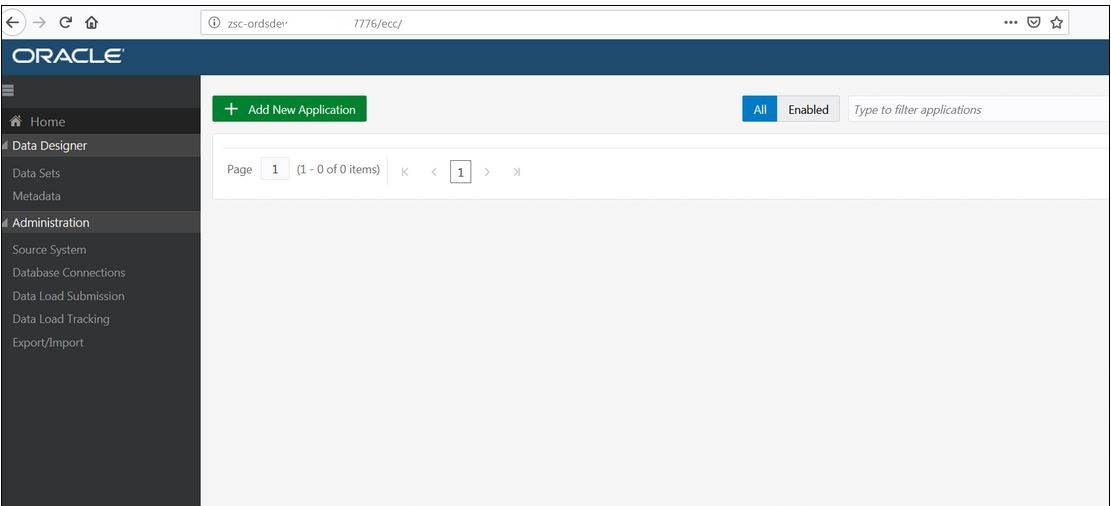
ECC console login
http://xxxx.FQDN:7776/ecc/
Configuring the JNDI to Connect to Oracle E-Business Suite
EBS front end – soruce run file system, cd $FND_SECURE
[oratest@xxxx secure]$ cp TEST.dbc TEST.dbc.bak
[oratest@xxxx secure]$ java oracle.apps.fnd.security.AdminDesktop / CREATE NODE_NAME=<EBS host>.FQDN DBC=/u02/apptest/fs1/inst/apps/TEST_xxxx/appl/fnd/12.0.0/secure/TEST.dbc
Application node exists, using server ID of node.
 Committing changes
 CREATE executed successfully - TEST_XXXX.FQDN.dbc
<ECC Framework host>
[oracle@ quickInstall]$ scp oratest@XXXX:/u02/apptest/fs1/inst/apps/TEST_XXXX-02/appl/fnd/12.0.0/secure/TEST_XXXX.FQDN.dbc connection.dbc
scp over TEST_XXXX.FQDN.dbc to <ECC framework Host> and rename to connection.dbc
[oracle@ quickInstall]$ ./envSetup.sh
4
 Creating JNDI ….
 Checking connection.dbc file availability…
 DBC file /u02/ecc/Oracle/quickInstall/connection.dbc available
 Enter the EBS apps password:
 Verify if the Node is registered in the EBS database…
 Node name XXXX
 EBS_ECC_USER ECC_DISCOVERY
 DB URL xxxx.FQDN:1531/TEST
 Node is registerd in EBS
 Check if the FND USER ECC_DISCOVERY exists
 Creating new FND user with user name ECC_DISCOVERY
 Enter password (Passwords must be at least 5 characters long):ECC_DISCOVERY
 Confirm password:Connecting to EBS database xxxx.FQDN:1531/TEST..
 FND USER ECC_DISCOVERY successfully created
 Provide ECC admin credentials for JNDI setup
 Enter the password for weblogic admin for ECC domain :
 Creating JNDI for ECC to access EBS DB…
 CLASSPATH=/u02/ecc/Oracle/software/java/jdk/lib/tools.jar:/u02/ecc/Oracle/Middleware/wlserver/modules/features/wlst.wls.classpath.jar:
 PATH=/u02/ecc/Oracle/Middleware/wlserver/server/bin:/u02/ecc/Oracle/Middleware/wlserver/../oracle_common/modules/thirdparty/org.apache.ant/1.9.8.0.0/apache-ant-1.9.8/bin:/u02/ecc/Oracle/software/java/jdk/jre/bin:/u02/ecc/Oracle/software/java/jdk/bin:/u02/ecc/Oracle/software/java/jdk/bin:/u02/ecc/insta_client:/usr/local/bin:/usr/bin:/usr/local/sbin:/usr/sbin:/home/oracle/bin:/usr/lib/oracle/18.3/client64/bin/:/u02/ecc/Oracle/Middleware/wlserver/../oracle_common/modules/org.apache.maven_3.2.5/bin
 Your environment has been set.
 Initializing WebLogic Scripting Tool (WLST) …
 Welcome to WebLogic Server Administration Scripting Shell
 Type help() for help on available commands
 Connecting to t3://localhost:7775 with userid weblogic …
 Successfully connected to Admin Server "AdminServer" that belongs to domain "ecc_domain".
 Warning: An insecure protocol was used to connect to the server.
 To ensure on-the-wire security, the SSL port or Admin port should be used instead.
 Location changed to edit tree.
 This is a writable tree with DomainMBean as the root.
 To make changes you will need to start an edit session via startEdit().
 For more help, use help('edit').
 Starting an edit session …
 Started edit session, be sure to save and activate your changes once you are done.
 No stack trace available.
 ebsDB does not exist
 Saving all your changes …
 Saved all your changes successfully.
 Activating all your changes, this may take a while …
 The edit lock associated with this edit session is released once the activation is completed.
 Activation completed
 Disconnected from weblogic server: AdminServer
 JNDI created for EBS database…
ECC weblogic console login
http://xxxx.FQDN:7775/console
Services → Data soruces → ebsDB → Monitoring -> Testing
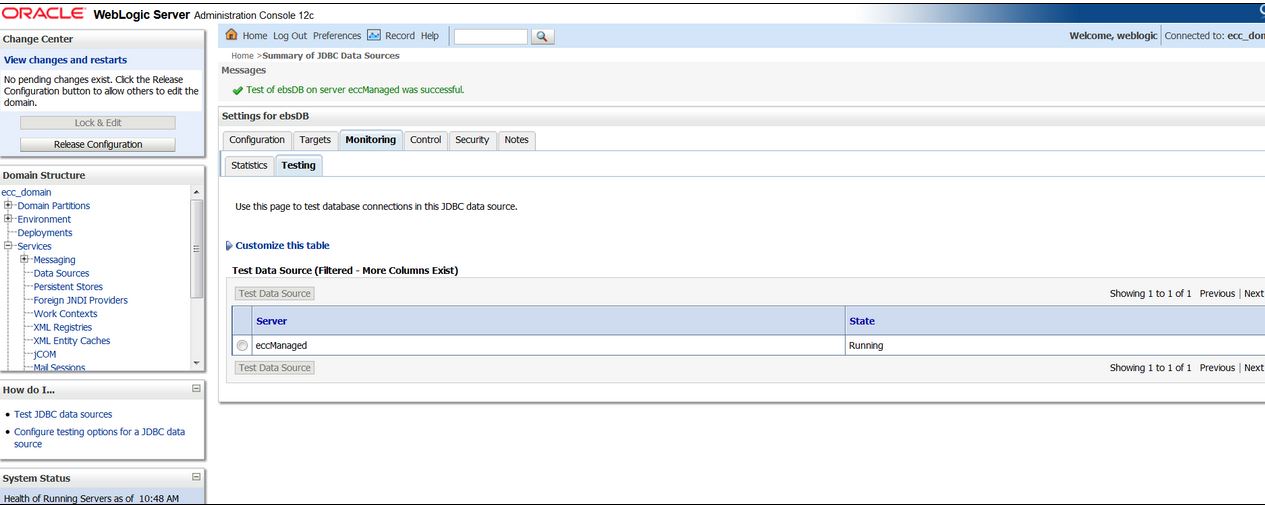
Release Configuration after test return success.
Integrate ECC with EBS
[oracle@ quickInstall]$ ./envSetup.sh
Select which option you want to proceed with
              1. Database Setup
              2. Install Weblogic Server
              3. Create ECC Domain
              4. Create EBS JNDI
              5. Integrate ECC with EBS
              6. Exit:
 5
 Proceed with Integration? confirm(y) otherwise(n):
 y
 Enter the password for ECC DB user ECC :thorinoak
 Enter the password for ECC admin user weblogic :
 Updating EBS Security Manager
 old   1: update ECC_SOURCE_SYSTEM set SECURITY_MANAGER='&1' where SYSTEM_NAME='EBS'
 new   1: update ECC_SOURCE_SYSTEM set SECURITY_MANAGER='oracle.ecc.security.extensions.EbsEccSecurityManager' where SYSTEM_NAME='EBS'
 1 row updated.
 Commit complete.
 Done
 Restarting the ECC managed server
 Stopping ECC Managed Server …
 Stopping Weblogic Server…
 Initializing WebLogic Scripting Tool (WLST) …
 Welcome to WebLogic Server Administration Scripting Shell
 Type help() for help on available commands
 Connecting to t3://localhost:7775 with userid weblogic …
 Successfully connected to Admin Server "AdminServer" that belongs to domain "ecc_domain".
 Warning: An insecure protocol was used to connect to the server.
 To ensure on-the-wire security, the SSL port or Admin port should be used instead.
 Shutting down the server eccManaged with force=false while connected to AdminServer …
 …..
 Exiting WebLogic Scripting Tool.
 Done
 Stopping Derby Server…
 Derby server stopped.
 ZooKeeper JMX enabled by default
 Using config: /u02/ecc/Oracle/software/zookeeper/bin/../conf/zoo.cfg
 Stopping zookeeper … STOPPED
 ZooKeeper JMX enabled by default
 Using config: /u02/ecc/Oracle/software/zookeeper/bin/../conf/zoo.cfg
 Starting zookeeper … STARTED
 Zookeeper started. Starting Managed Server
 Starting the eccManaged …
 Started the eccManaged successfully
 EBS_IP6 is EBSHOST-IP
 EBS_IP4 is EBSHOST-IP
 Setting Connection Filter for ECC Server …
 CLASSPATH=/u02/ecc/Oracle/software/java/jdk/lib/tools.jar:/u02/ecc/Oracle/Middleware/wlserver/modules/features/wlst.wls.classpath.jar:
 PATH=/u02/ecc/Oracle/Middleware/wlserver/server/bin:/u02/ecc/Oracle/Middleware/wlserver/../oracle_common/modules/thirdparty/org.apache.ant/1.9.8.0.0/apache-ant-1.9.8/bin:/u02/ecc/Oracle/software/java/jdk/jre/bin:/u02/ecc/Oracle/software/java/jdk/bin:/u02/ecc/Oracle/software/java/jdk/bin:/u02/ecc/insta_client:/usr/local/bin:/usr/bin:/usr/local/sbin:/usr/sbin:/home/oracle/bin:/usr/lib/oracle/18.3/client64/bin/:/u02/ecc/Oracle/Middleware/wlserver/../oracle_common/modules/org.apache.maven_3.2.5/bin
 Your environment has been set.
 Initializing WebLogic Scripting Tool (WLST) …
 Welcome to WebLogic Server Administration Scripting Shell
 Type help() for help on available commands
 Connecting to t3://localhost:7775 with userid weblogic …
 Successfully connected to Admin Server "AdminServer" that belongs to domain "ecc_domain".
 Warning: An insecure protocol was used to connect to the server.
 To ensure on-the-wire security, the SSL port or Admin port should be used instead.
 Location changed to domainConfig tree. This is a read-only tree
 with DomainMBean as the root MBean.
 For more help, use help('domainConfig')
 Location changed to domainRuntime tree. This is a read-only tree
 with DomainMBean as the root MBean.
 For more help, use help('domainRuntime')
 Server name AdminServer
 IPv4URL t3://ECCHOST-IP:7775
 t3://[0:0:0:0:0:0:0:1%lo]:7775
 Location changed to edit tree.
 This is a writable tree with DomainMBean as the root.
 To make changes you will need to start an edit session via startEdit().
 For more help, use help('edit').
 Starting an edit session …
 Started edit session, be sure to save and activate your changes once you are done.
 Saving all your changes …
 Saved all your changes successfully.
 Activating all your changes, this may take a while …
 The edit lock associated with this edit session is released once the activation is completed.
 Activation completed
 Connection Filter is applied sucessfully..
 Done.
 old   8: l_conn_string VARCHAR2(300) :='&&3';
 new   8: l_conn_string VARCHAR2(300) :='http://xxxx.FQDN:8010';
 old   9: l_conn_name   VARCHAR2(30)  := '&&1';
 new   9: l_conn_name   VARCHAR2(30)  := 'ebsdb';
 old  10: l_system_name VARCHAR2(100) := '&&2';
 new  10: l_system_name VARCHAR2(100) := 'EBS';
 Source System with  System Name = EBS already exists .
 Updating Source System with Parameters : Connection String =
 http://xxxx.FQDN:8010 Connection Name = ebsdb System Name = EBS
 protcol = http:
 protcol = http:
 protcol = http
 protoppos = 8
 port_pos = 33
 l_hostname =xxxx.FQDN
 l_port =8010
 Updated  Source System with Parameters : Connection String =
 http://xxxx.FQDN:8010 Connection Name = ebsdb System Name = EBS
 PL/SQL procedure successfully completed.
- EBS front end
- Navigate to System Administration: Oracle Applications Manager > AutoConfig.
- Select the application tier context file, and choose Edit Parameters.
- Search for the
s_ecc_conf_commentvariable by selectingOA_VARin the search list of values and enterings_ecc_conf_commentin the search text box. - Remove the number sign (
#) from the Value field for thes_ecc_conf_commentvariable to ensure that this variable is not commented. Then choose the Save button - remove “#” from s_ecc_conf_comment OA_VAR
- s_ecc_protocol – http
- s_ecc_web_host – xxxx.FQDN
- s_ecc_managed_server_port – 7776
If your EBS environment has proxy setting,ensure following OA_VAR are set
- s_proxybypassdomain – *.FQDN
- s_nonproxyhosts – *.FQDN
If you dont have above OA_VAR set up properly, your ECC dataload concurrent request will error out with generic HTTP 411 error.
[oratest@ ~]$ adautocfg.sh
[oratest@ ~]$ grep -i s_ohs_instance_loc $CONTEXT_FILE
<ohs_instance_loc oa_var=”s_ohs_instance_loc”>/u02/apptest/fs1/FMW_Home/webtier/instances/EBS_web_TEST_OHS1</ohs_instance_loc>
[oratest@ ~]$ grep -i s_ohs_component $CONTEXT_FILE
<ohs_component oa_var=”s_ohs_component”>EBS_web_TEST</ohs_component>
[oratest@EBS_web_TEST_OHS1]$ vi /u02/apptest/fs1/FMW_Home/webtier/instances/EBS_web_TEST_OHS1/config/OHS/EBS_web_TEST/ecc.conf (verify)
RewriteEngine on
 RewriteRule ^/ecc$  http://xxxx.FQDN:7776/ecc/?system=EBS [CO=ORA_ECC_GUEST_LANG:en:xxxx.FQDN,NE,P,QSA,L]
Clean up
Clear cabo cahce
[oratest@ EBS_web_TEST_OHS1]$ cd /u02/apptest/fs1/FMW_Home/Oracle_EBS-app1/applications/oacore/html/cabo/styles/cache/
bounce EBS front end
Import Enterprise Command Center Applications
EBS front end
cd $RUN_BASE
[oratest@ fs1]$ scp oracle@<ECC framework host>:/u02/ecc/Oracle/quickInstall/scripts/patchEccFiles.pl /u02/apptest/fs1/.
[oratest@ fs1]$ mkdir -p /tmp/patchEccFile
./patchEccFiles.pl
Enter temporary directory for ECC Files(Should be used only for this task and be empty): /tmp/patchEccFile
 Enter EBS DB apps user id(default: apps) :
 Enter EBS DB apps user password:
 List of languages installed in EBS:

 | Language                      | ECC Language Code|

 | AMERICAN                      | en               |
 List of languages supported in ECC:
 Arabic(ar), Brazilian Portugese(pt), Canadian French(fr-CA),Croatian(hr), Cyrillic Kazakh(kk), Cyrillic Serbian(sr), Czech(cs), Danish(da), Dutch(nl), English(en), Finnish(fi), French(fr), German(de), Greek(el), Hebrew(he), Hungarian(hu), Indonesian(id), Italian(it), Japanese(ja), Korean(ko), Latin Spanish(es-419),Latin Serbian(sr-Latn), Lithuanian(lt), Norwegian(no), Polish(pl), Portugese(pt-PT),Romania(ro), Russian(ru), Simplified Chinese(zh-Hans), Slovak(sk), Slovenian(sl), Spanish(es), Swedish(sv),  Thai(th), Traditional Chinese(zh-Hant), Turkish(tr), Ukranian(uk), Vietnamese(vi)
 NOTE: Only languages installed and enabled in ECC will be processed successfully
 Example: Enter ar,pt for Arabic and Brazilian Portugese language respectively. Enter all(ALL) for all languages
 Enter the Language code(s) from the list mentioned above to run the translation for: en
 Do you want to add all products at once(Y) or specify the subset(N): Y
 Adding product top AP
 Adding product top AR
 Adding product top BOM
 Adding product top CN
 Adding product top CS
 Adding product top EAM
 Adding product top FA
 Adding product top GMO
 Adding product top ICX
 Adding product top INV
 Adding product top JMF
 Adding product top OKL
 Adding product top OKS
 Adding product top ONT
 Adding product top OZF
 Adding product top PA
 Adding product top PO
 Adding product top WIP
 Importing application /tmp/patchEccFile/ap/12.0.0/patch/115/ecc/applications/ap_ecc.zip
 ECC WEB ENTRY URL:http://xxxx.FQDN:8010/ecc
 ECC Application File:/tmp/patchEccFile/ap/12.0.0/patch/115/ecc/applications/ap_ecc.zip
 Importing file /tmp/patchEccFile/ap/12.0.0/patch/115/ecc/applications/ap_ecc.zip finished with response [{"STATUS":200,"logFileName":"import_20190502111702.log"}]
 Imported application /tmp/patchEccFile/ap/12.0.0/patch/115/ecc/applications/ap_ecc.zip successfully
 Importing application /tmp/patchEccFile/ar/12.0.0/patch/115/ecc/applications/ar_ecc.zip
 ECC WEB ENTRY URL:http://xxxx.FQDN:8010/ecc
 ECC Application File:/tmp/patchEccFile/ar/12.0.0/patch/115/ecc/applications/ar_ecc.zip
 Importing file /tmp/patchEccFile/ar/12.0.0/patch/115/ecc/applications/ar_ecc.zip finished with response [{"STATUS":200,"logFileName":"import_20190502111704.log"}]
 Imported application /tmp/patchEccFile/ar/12.0.0/patch/115/ecc/applications/ar_ecc.zip successfully
 Importing application /tmp/patchEccFile/bom/12.0.0/patch/115/ecc/applications/cst_ecc.zip
 ECC WEB ENTRY URL:http://xxxx.FQDN:8010/ecc
 ECC Application File:/tmp/patchEccFile/bom/12.0.0/patch/115/ecc/applications/cst_ecc.zip
 Importing file /tmp/patchEccFile/bom/12.0.0/patch/115/ecc/applications/cst_ecc.zip finished with response [{"STATUS":200,"logFileName":"import_20190502111705.log"}]
 Imported application /tmp/patchEccFile/bom/12.0.0/patch/115/ecc/applications/cst_ecc.zip successfully
 Importing application /tmp/patchEccFile/cn/12.0.0/patch/115/ecc/applications/cn_ecc.zip
 ECC WEB ENTRY URL:http://xxxx.FQDN:8010/ecc
 ECC Application File:/tmp/patchEccFile/cn/12.0.0/patch/115/ecc/applications/cn_ecc.zip
 Importing file /tmp/patchEccFile/cn/12.0.0/patch/115/ecc/applications/cn_ecc.zip finished with response [{"STATUS":200,"logFileName":"import_20190502111706.log"}]
 Imported application /tmp/patchEccFile/cn/12.0.0/patch/115/ecc/applications/cn_ecc.zip successfully
 Importing application /tmp/patchEccFile/cs/12.0.0/patch/115/ecc/applications/cs_ecc.zip
 ECC WEB ENTRY URL:http://xxxx.FQDN:8010/ecc
 ECC Application File:/tmp/patchEccFile/cs/12.0.0/patch/115/ecc/applications/cs_ecc.zip
 Importing file /tmp/patchEccFile/cs/12.0.0/patch/115/ecc/applications/cs_ecc.zip finished with response [{"STATUS":200,"logFileName":"import_20190502111707.log"}]
 Imported application /tmp/patchEccFile/cs/12.0.0/patch/115/ecc/applications/cs_ecc.zip successfully
 Importing application /tmp/patchEccFile/eam/12.0.0/patch/115/ecc/applications/eam_ecc.zip
 ECC WEB ENTRY URL:http://xxxx.FQDN:8010/ecc
 ECC Application File:/tmp/patchEccFile/eam/12.0.0/patch/115/ecc/applications/eam_ecc.zip
 Importing file /tmp/patchEccFile/eam/12.0.0/patch/115/ecc/applications/eam_ecc.zip finished with response [{"STATUS":200,"logFileName":"import_20190502111708.log"}]
 Imported application /tmp/patchEccFile/eam/12.0.0/patch/115/ecc/applications/eam_ecc.zip successfully
 Importing application /tmp/patchEccFile/fa/12.0.0/patch/115/ecc/applications/fa_ecc.zip
 ECC WEB ENTRY URL:http://xxxx.FQDN:8010/ecc
 ECC Application File:/tmp/patchEccFile/fa/12.0.0/patch/115/ecc/applications/fa_ecc.zip
 Importing file /tmp/patchEccFile/fa/12.0.0/patch/115/ecc/applications/fa_ecc.zip finished with response [{"STATUS":200,"logFileName":"import_20190502111709.log"}]
 Imported application /tmp/patchEccFile/fa/12.0.0/patch/115/ecc/applications/fa_ecc.zip successfully
 Importing application /tmp/patchEccFile/gmo/12.0.0/patch/115/ecc/applications/gmo_ecc.zip
 ECC WEB ENTRY URL:http://xxxx.FQDN:8010/ecc
 ECC Application File:/tmp/patchEccFile/gmo/12.0.0/patch/115/ecc/applications/gmo_ecc.zip
 Importing file /tmp/patchEccFile/gmo/12.0.0/patch/115/ecc/applications/gmo_ecc.zip finished with response [{"STATUS":200,"logFileName":"import_20190502111709.log"}]
 Imported application /tmp/patchEccFile/gmo/12.0.0/patch/115/ecc/applications/gmo_ecc.zip successfully
 Importing application /tmp/patchEccFile/icx/12.0.0/patch/115/ecc/applications/icx_ecc.zip
 ECC WEB ENTRY URL:http://xxxx.FQDN:8010/ecc
 ECC Application File:/tmp/patchEccFile/icx/12.0.0/patch/115/ecc/applications/icx_ecc.zip
 Importing file /tmp/patchEccFile/icx/12.0.0/patch/115/ecc/applications/icx_ecc.zip finished with response [{"STATUS":200,"logFileName":"import_20190502111711.log"}]
 Imported application /tmp/patchEccFile/icx/12.0.0/patch/115/ecc/applications/icx_ecc.zip successfully
 Importing application /tmp/patchEccFile/inv/12.0.0/patch/115/ecc/applications/inv_ecc.zip
 ECC WEB ENTRY URL:http://xxxx.FQDN:8010/ecc
 ECC Application File:/tmp/patchEccFile/inv/12.0.0/patch/115/ecc/applications/inv_ecc.zip
 Importing file /tmp/patchEccFile/inv/12.0.0/patch/115/ecc/applications/inv_ecc.zip finished with response [{"STATUS":200,"logFileName":"import_20190502111712.log"}]
 Imported application /tmp/patchEccFile/inv/12.0.0/patch/115/ecc/applications/inv_ecc.zip successfully
 Importing application /tmp/patchEccFile/jmf/12.0.0/patch/115/ecc/applications/osm_ecc.zip
 ECC WEB ENTRY URL:http://xxxx.FQDN:8010/ecc
 ECC Application File:/tmp/patchEccFile/jmf/12.0.0/patch/115/ecc/applications/osm_ecc.zip
 Importing file /tmp/patchEccFile/jmf/12.0.0/patch/115/ecc/applications/osm_ecc.zip finished with response [{"STATUS":200,"logFileName":"import_20190502111713.log"}]
 Imported application /tmp/patchEccFile/jmf/12.0.0/patch/115/ecc/applications/osm_ecc.zip successfully
 Importing application /tmp/patchEccFile/okl/12.0.0/patch/115/ecc/applications/okl_ecc.zip
 ECC WEB ENTRY URL:http://xxxx.FQDN:8010/ecc
 ECC Application File:/tmp/patchEccFile/okl/12.0.0/patch/115/ecc/applications/okl_ecc.zip
 Importing file /tmp/patchEccFile/okl/12.0.0/patch/115/ecc/applications/okl_ecc.zip finished with response [{"STATUS":200,"logFileName":"import_20190502111713.log"}]
 Imported application /tmp/patchEccFile/okl/12.0.0/patch/115/ecc/applications/okl_ecc.zip successfully
 Importing application /tmp/patchEccFile/oks/12.0.0/patch/115/ecc/applications/oks_ecc.zip
 ECC WEB ENTRY URL:http://xxxx.FQDN:8010/ecc
 ECC Application File:/tmp/patchEccFile/oks/12.0.0/patch/115/ecc/applications/oks_ecc.zip
 Importing file /tmp/patchEccFile/oks/12.0.0/patch/115/ecc/applications/oks_ecc.zip finished with response [{"STATUS":200,"logFileName":"import_20190502111714.log"}]
 Imported application /tmp/patchEccFile/oks/12.0.0/patch/115/ecc/applications/oks_ecc.zip successfully
 Importing application /tmp/patchEccFile/ont/12.0.0/patch/115/ecc/applications/ont_ecc.zip
 ECC WEB ENTRY URL:http://xxxx.FQDN:8010/ecc
 ECC Application File:/tmp/patchEccFile/ont/12.0.0/patch/115/ecc/applications/ont_ecc.zip
 Importing file /tmp/patchEccFile/ont/12.0.0/patch/115/ecc/applications/ont_ecc.zip finished with response [{"STATUS":200,"logFileName":"import_20190502111715.log"}]
 Imported application /tmp/patchEccFile/ont/12.0.0/patch/115/ecc/applications/ont_ecc.zip successfully
 Importing application /tmp/patchEccFile/ozf/12.0.0/patch/115/ecc/applications/ozf_ecc.zip
 ECC WEB ENTRY URL:http://xxxx.FQDN:8010/ecc
 ECC Application File:/tmp/patchEccFile/ozf/12.0.0/patch/115/ecc/applications/ozf_ecc.zip
 Importing file /tmp/patchEccFile/ozf/12.0.0/patch/115/ecc/applications/ozf_ecc.zip finished with response [{"STATUS":200,"logFileName":"import_20190502111716.log"}]
 Imported application /tmp/patchEccFile/ozf/12.0.0/patch/115/ecc/applications/ozf_ecc.zip successfully
 Importing application /tmp/patchEccFile/po/12.0.0/patch/115/ecc/applications/po_ecc.zip
 ECC WEB ENTRY URL:http://xxxx.FQDN:8010/ecc
 ECC Application File:/tmp/patchEccFile/po/12.0.0/patch/115/ecc/applications/po_ecc.zip
 Importing file /tmp/patchEccFile/po/12.0.0/patch/115/ecc/applications/po_ecc.zip finished with response [{"STATUS":200,"logFileName":"import_20190502111716.log"}]
 Imported application /tmp/patchEccFile/po/12.0.0/patch/115/ecc/applications/po_ecc.zip successfully
 Importing application /tmp/patchEccFile/wip/12.0.0/patch/115/ecc/applications/wip_ecc.zip
 ECC WEB ENTRY URL:http://xxxx.FQDN:8010/ecc
 ECC Application File:/tmp/patchEccFile/wip/12.0.0/patch/115/ecc/applications/wip_ecc.zip
 Importing file /tmp/patchEccFile/wip/12.0.0/patch/115/ecc/applications/wip_ecc.zip finished with response [{"STATUS":200,"logFileName":"import_20190502111718.log"}]
 Imported application /tmp/patchEccFile/wip/12.0.0/patch/115/ecc/applications/wip_ecc.zip successfully
 SUMMARY REPORT:

 | Product       | Application   | Status        |

 | AP            | ap_ecc.zip    | Success       |
 | AR            | ar_ecc.zip    | Success       |
 | BOM           | cst_ecc.zip   | Success       |
 | CN            | cn_ecc.zip    | Success       |
 | CS            | cs_ecc.zip    | Success       |
 | EAM           | eam_ecc.zip   | Success       |
 | FA            | fa_ecc.zip    | Success       |
 | GMO           | gmo_ecc.zip   | Success       |
 | ICX           | icx_ecc.zip   | Success       |
 | INV           | inv_ecc.zip   | Success       |
 | JMF           | osm_ecc.zip   | Success       |
 | OKL           | okl_ecc.zip   | Success       |
 | OKS           | oks_ecc.zip   | Success       |
 | ONT           | ont_ecc.zip   | Success       |
 | OZF           | ozf_ecc.zip   | Success       |
 | PO            | po_ecc.zip    | Success       |
 | WIP           | wip_ecc.zip   | Success       |
Role Base Access Configuration (Example – logistic manager)
create rbaInventory.csv
PERMISSION_SET_CODE,RESPONSIBILITY_CODE,ENDECA_ROLE_CODE
WSH_ECC_DASHBOARD_ACCESS_PS,FND_RESP|INV|INV_HTML|STANDARD,UMX|WSH_ECC_DASHBOARD_ACCESS_ROLE
[oratest@ ecc]$ cd /u02/apptest/fs1/EBSapps/appl/fnd/12.0.0/bin/
[oratest@bin]$ ./UMX_ENDECA_RBACAuto.sh
APPS username: <EBS apps user>
APPS password:
Enter csv file name with full path : /u02/apptest/ecc/rbaInventory.csv
Executing for Permission_set WSH_ECC_DASHBOARD_ACCESS_PS , Responsibility_name FND_RESP|INV|INV_HTML|STANDARD and Endeca_Role UMX|WSH_ECC_DASHBOARD_ACCESS_ROLE
 old   6: L_MENU_NAME varchar2(100) := '&1';
 new   6: L_MENU_NAME varchar2(100) := 'WSH_ECC_DASHBOARD_ACCESS_PS';
 old   8: l_responsibility_name varchar2(300) := '&2';
 new   8: l_responsibility_name varchar2(300) := 'FND_RESP|INV|INV_HTML|STANDARD';
 old  10: endeca_role_name varchar2(300) := '&3';
 new  10: endeca_role_name varchar2(300) := 'UMX|WSH_ECC_DASHBOARD_ACCESS_ROLE';
 Completed Successfully.
 PL/SQL procedure successfully completed.
At this point you can run ECC dataload jobs from “shipped” responsibilities and view ECC dashboard via “shipped” responsibility.
 Oracle Journey
while Import Enterprise Command Center Applications (./patchEccFiles.pl). please help me on this
Importing application /tmp/patchEccFile/fa/12.0.0/patch/115/ecc/applications/fa_ecc.zip
ECC WEB ENTRY URL:http://abc.abc.com:8000/ecc
ECC Application File:/tmp/patchEccFile/fa/12.0.0/patch/115/ecc/applications/fa_ecc.zip
ERROR: Failed with status 500 for url http://abc.abc.com:8000/ecc/user/import/applications?gfmString=Q6cKS_TYxMW-Rn9FfGG8-g..
Please check the log: null in ECC instance for error details
java.lang.Exception: http://abc.abc.com:8000/ecc/user/import/applications?gfmString=Q6cKS_TYxMW-Rn9FfGG8-g.. failed with HTTP status: 500
at oracle.ecc.client.util.ApplicationImporter.finish(ApplicationImporter.java:216)
at oracle.ecc.client.util.ApplicationImporter.importApplication(ApplicationImporter.java:113)
at oracle.ecc.client.ECCClient.main(ECCClient.java:71)
Import of applications failed
ERROR: Importing application /tmp/patchEccFile/fa/12.0.0/patch/115/ecc/applications/fa_ecc.zip failed
LikeLike
while Import Enterprise Command Center Applications (./patchEccFiles.pl) facing below error. please help me on this
Importing application /tmp/patchEccFile/fa/12.0.0/patch/115/ecc/applications/fa_ecc.zip
ECC WEB ENTRY URL:http://abc.abc.com:8000/ecc
ECC Application File:/tmp/patchEccFile/fa/12.0.0/patch/115/ecc/applications/fa_ecc.zip
ERROR: Failed with status 500 for url http://abc.abc.com:8000/ecc/user/import/applications?gfmString=Q6cKS_TYxMW-Rn9FfGG8-g..
Please check the log: null in ECC instance for error details
java.lang.Exception: http://abc.abc.com:8000/ecc/user/import/applications?gfmString=Q6cKS_TYxMW-Rn9FfGG8-g.. failed with HTTP status: 500
at oracle.ecc.client.util.ApplicationImporter.finish(ApplicationImporter.java:216)
at oracle.ecc.client.util.ApplicationImporter.importApplication(ApplicationImporter.java:113)
at oracle.ecc.client.ECCClient.main(ECCClient.java:71)
Import of applications failed
ERROR: Importing application /tmp/patchEccFile/fa/12.0.0/patch/115/ecc/applications/fa_ecc.zip failed
LikeLike
Hi Shivvaa,
Have you applied the EBS patches related to ECC? There are a lot EBS patches certain AD/TXK level (11), A lot of ECC related EBS patches.
LikeLike
Hi Bo,
yes i applied all patches.
LikeLike
Hmmm, ok. On your ECC instance, there should be an import log under $ECC_BASE/Oracle/quickInstall/logs/ecc/import_.log.
Can you scan through your current import logs and see if you find anything?
LikeLike
import log not created
-rw-r—–. 1 apdnidci oinstall 0 Apr 15 08:54 sql.log
-rw-r—–. 1 apdnidci oinstall 308K Apr 15 11:50 logback.log
-rw-r—–. 1 apdnidci oinstall 315K Apr 15 11:50 ecc-web-2020-04-15.log
[apdnidci@axxxxxxp04 ecc]$ pwd
/u01/ECC/Oracle/quickInstall/logs/ecc
LikeLike
this URL is not accessible. that is main issue i think
is there any setup we need to do to access
ERROR: Failed with status 500 for url http://abc.abc.com:8000/ecc
LikeLike
What are your ECC_ADMIN_PORT and ECC_MANAGED_PORT in ECC Config properties? You don’t have to post it here.
Can you get to the Weblogic admin console? ECC host:ECC admin port/console
Log into your weblogic server and see if the managed server is running at all.
LikeLike
yes up and running fine
LikeLike
Okay how about anything under eccManaged.log or access.log under $ECC_BASE/Oracle/Middleware/user_projects/domains/ecc_domains/servers/eccManaged/logs?
LikeLike
in access.log file
10.137.4.24 – – [15/Apr/2020:11:32:38 +0000] “GET /core_ecc/admin/metrics?key=solr.jvm%3Aos.processCpuLoad&key=solr.node%3ACONTAINER.fs.coreRoot.usableSpace&key=solr.jvm%3Aos.systemLoadAverage&key=solr.jvm%3Amemory.heap.used&wt=javabin&version=2 HTTP/1.1” 200 215
10.137.4.24 – – [15/Apr/2020:11:32:38 +0000] “POST /ecc/user/import/applications?system=EBS&gfmString=uH5-K_Yvq7gix75CZFpilg.. HTTP/1.1” 500 4
10.137.4.24 – – [15/Apr/2020:11:32:39 +0000] “POST /ecc/user/import/applications?system=EBS&gfmString=jDymVCWRB0z-yBZ6zxuv6g.. HTTP/1.1” 500 4
10.137.4.24 – – [15/Apr/2020:11:32:39 +0000] “POST /ecc/user/import/applications?system=EBS&gfmString=RojsE5_EPlvMCXR1T7Xnwg.. HTTP/1.1” 500 4
10.137.4.24 – – [15/Apr/2020:11:32:39 +0000] “POST /ecc/user/import/applications?system=EBS&gfmString=Z38qMK73IRq1-A6zMDzWLA.. HTTP/1.1” 500 4
10.137.4.24 – – [15/Apr/2020:11:32:40 +0000] “POST /ecc/user/import/applications?system=EBS&gfmString=hVQHm7jldt42_m4bxu_H_w.. HTTP/1.1” 500 4
10.137.4.24 – – [15/Apr/2020:11:32:40 +0000] “POST /ecc/user/import/applications?system=EBS&gfmString=0-nUvQHICZo6uQnw5LM-CQ.. HTTP/1.1” 500 4
10.137.4.24 – – [15/Apr/2020:11:32:40 +0000] “POST /ecc/user/import/applications?system=EBS&gfmString=7KaG7iV7yyqbcqQScO9e6g.. HTTP/1.1” 500 4
10.137.4.24 – – [15/Apr/2020:11:32:41 +0000] “POST /ecc/user/import/applications?system=EBS&gfmString=o20YdT-nILF30yZsskRp1A.. HTTP/1.1” 500 4
10.137.4.24 – – [15/Apr/2020:11:32:41 +0000] “POST /ecc/user/import/applications?system=EBS&gfmString=IthcCdNUmU6r0dqs8y-Rng.. HTTP/1.1” 500 4
10.137.4.24 – – [15/Apr/2020:11:32:41 +0000] “POST /ecc/user/import/applications?system=EBS&gfmString=Ga32-8R3kUFKjInyjOpBXw.. HTTP/1.1” 500 4
10.137.4.24 – – [15/Apr/2020:11:32:42 +0000] “POST /ecc/user/import/applications?system=EBS&gfmString=peGl8KsBtBnP9_wb_9gfpg.. HTTP/1.1” 500 4
10.137.4.24 – – [15/Apr/2020:11:32:42 +0000] “POST /ecc/user/import/applications?system=EBS&gfmString=47Lav7200C4Ahv8-Get5Vg.. HTTP/1.1” 500 4
10.137.4.24 – – [15/Apr/2020:11:32:43 +0000] “POST /ecc/user/import/applications?system=EBS&gfmString=YHSQS4uyR2yvhZxg5Bqr2g.. HTTP/1.1” 500 4
10.137.4.24 – – [15/Apr/2020:11:32:43 +0000] “POST /ecc/user/import/applications?system=EBS&gfmString=_j_CULD2DIhp7dEd4_Gjww.. HTTP/1.1” 500 4
10.137.4.24 – – [15/Apr/2020:11:32:43 +0000] “POST /ecc/user/import/applications?system=EBS&gfmString=M4KTbaRfEWhM1LngIntumA.. HTTP/1.1” 500 4
LikeLike
no error in eccManaged.log
LikeLike
So at one point before doing the “Configuring the JNDI to connect to Oracle E-business Suite Step”, you were able to log into your ECC Framework right?
After running envSetpup.sh Step 3 “Create ECC Domain”,
():()/ecc
LikeLike
yes i able to login
LikeLike
Do you still have the logs for envSetup.sh
4. Create EBS JNDI
5. Integrate ECC with EBS
LikeLike
all setup completed successfully but i’m unable to access ECC url this issue . that is problem
http://abc.abc.com:8000/ecc
Importing application /tmp/stag/fa/12.0.0/patch/115/ecc/applications/fa_ecc.zip
ECC WEB ENTRY URL:http://abc.abc.com:8000/ecc
ECC Application File:/tmp/stag/fa/12.0.0/patch/115/ecc/applications/fa_ecc.zip
ERROR: Failed with status 404 for url http://abc.abc.com:8000/ecc/user/import/applications?gfmString=f3GBOWtYG14b_PvalBLmBg..
Please check the log:
LikeLike
Could it be possible that you can’t run ECC apps on port 8000? Can you retry it with the default port?
LikeLike
Was this ever resolved? I am having the same issue
LikeLike
Hi Michael, which port are you running your ECC managed server and admin server on?
LikeLike
I am using the default ports. I can access the weblogic admin server through 7775, but during the import phase, I am getting the same errors as above and for some reason it is trying to access 8000
LikeLike
also, i am not able to access the managed server directly. I am getting a “user is not authenticated to access /ecc/index.jsp”
LikeLike
Yes, once you run all the five steps from envSetup.sh, you can only access your managed server from EBS responsibility (ECC Developer).
LikeLike
May I please see the error message you see during the import again?
LikeLike
ERROR: Failed with status 404 for url http://:8000/ecc/user/import/applications…..
LikeLike
Yes, that is fine. But I am not able to import the applications during the final step. I am getting the 404 error mentioned above at this point. Is this something to do with user permissions? I did not see this mentioned in the official docs until later in the process. Thank you
LikeLike
Have you done this part,yet?
Changing EBS CONTEXT_FILE parameters
remove “#” from s_ecc_conf_comment OA_VAR
s_ecc_protocol – http
s_ecc_web_host – xxxx.FQDN
s_ecc_managed_server_port – 7776
LikeLike
One thing I did notice is that I change this variable, and then after running adautocfg, I checked the variable again and the # was put back, but the other changed variables remained unchanged.
LikeLike
It definitely not supposed to do that at all. If you look at the adautocfg log, it might tell you why # was put it back in there.
Did you change that OA_VAR from EBS -> Oracle Application Manager or directly vi $CONTEXT_FILE?
LikeLike
Another thing you can try is to keep moving forward and Setup/run Role Base Access Configuration then reimport the dashboards again. Let me know how it goes.
LikeLiked by 1 person
Will do. Thank you for the suggestions and help
LikeLike