
There are two MOS notes pertaining to enabling page tracking in EBS.
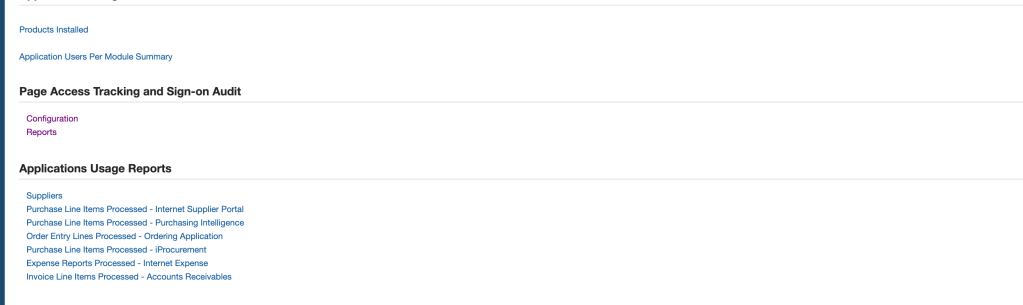
Log into EBS ->System Administrator -> Oracle Application Manager -> Application Usage -> Configuration
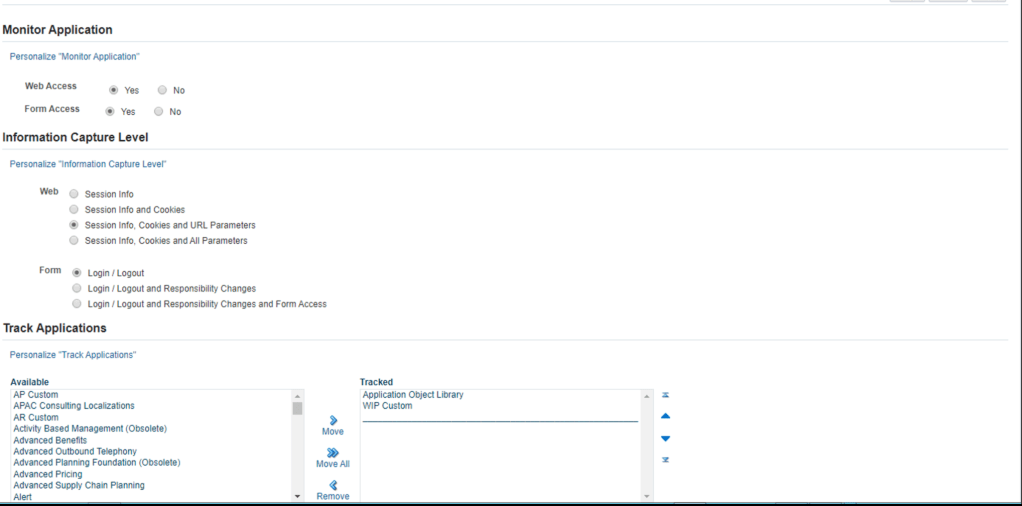
Set Web Access to “Yes” then Select “Information Capture Level” as you desired. (I pick “Session Info” only), then move all the “Application” you wish to track under “Track Application”. This will required JVM bounce.
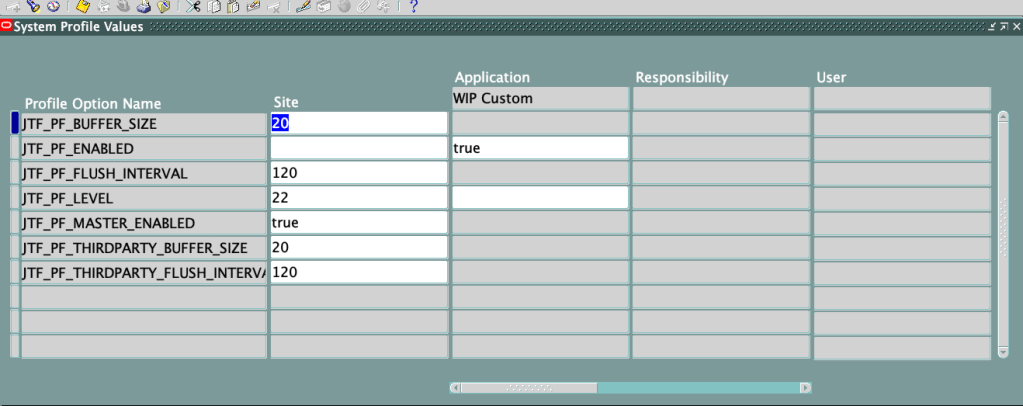
If it is a custom application, you may need to set Profile Option Value – JTF_PF_ENABLED at the application level.
Required to run a concurrent request “Page Access Tracking Data Migration” so that the underlying tables gets populated with a most recent value.
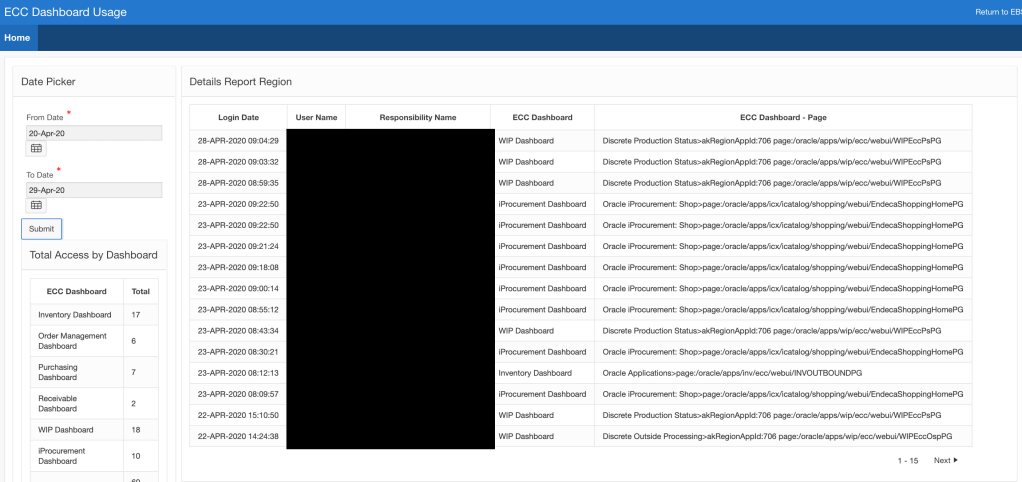
After this you could use EBS ->System Administrator -> Oracle Application Manager -> Application Usage ->Report OR (in my case, I wrote a couple of SQL queries and throw them in Oracle APEX – more intuitive for me than reading the canned report)
Below query give you the time of the access, User Name, Responsibility, and the Dashboard Name ( I had to use case statement to get the correct Dashboard name.
SELECT
    to_char(jps.timestamp, 'DD-MON-YYYY HH24:MI:SS') login_date,
    fu.user_name,
    fre.responsibility_name,
    case
        when  (jps.pagename like ('%inv%') and jps.pagename like ('%INV%')  ) then 'Inventory Dashboard'
        when  (jps.pagename like ('%wip%') and jps.pagename like ('%WIP%')  ) then 'WIP Dashboard'
        when  (jps.pagename like ('%ont%') and jps.pagename like ('%OM%')  ) then 'Order Management Dashboard'
        when  (jps.pagename like ('%po%') and jps.pagename like ('%ecc%')  ) then 'Purchasing Dashboard'
        when  (jps.pagename like ('%ar%') and jps.pagename like ('%AR%')  ) then 'Receivable Dashboard'
        when  (jps.pagename like ('%icx%') and jps.pagename like ('%Endeca%')  ) then 'iProcurement Dashboard'
    else jps.pagename
    end as "ECC Dashboard"
    ,jps.pagename  "ECC Dashboard - Page"
FROM
    jtf_pf_ses_activity     jps,
    fnd_user                fu,
    fnd_responsibility_tl   fre
WHERE
    jps.userid = fu.user_id
    AND jps.respid = fre.responsibility_id
    AND (jps.pagename LIKE '%ecc%' or jps.pagename LIKE '%iPro%')
    AND trunc(jps.timestamp) between to_date(:P1_FROM_DATE, 'DD-MON-YY') and to_date(:P1_TO_DATE, 'DD-MON-YY')
ORDER BY
    jps.timestamp DESC;
Second Query – Give aggregated value of how many times, each page were visited.
SELECT
    case
        when  (jps.pagename like ('%inv%') and jps.pagename like ('%INV%')  ) then 'Inventory Dashboard'
        when  (jps.pagename like ('%wip%') and jps.pagename like ('%WIP%')  ) then 'WIP Dashboard'
        when  (jps.pagename like ('%ont%') and jps.pagename like ('%OM%')  ) then 'Order Management Dashboard'
        when  (jps.pagename like ('%po%') and jps.pagename like ('%ecc%')  ) then 'Purchasing Dashboard'
        when  (jps.pagename like ('%ar%') and jps.pagename like ('%AR%')  ) then 'Receivable Dashboard'
        when  (jps.pagename like ('%icx%') and jps.pagename like ('%Endeca%')  ) then 'iProcurement Dashboard'
    else jps.pagename
    end as "ECC Dashboard" ,
    COUNT ( case
        when  (jps.pagename like ('%inv%') and jps.pagename like ('%INV%')  ) then 'Inventory Dashboard'
        when  (jps.pagename like ('%wip%') and jps.pagename like ('%WIP%')  ) then 'WIP Dashboard'
        when  (jps.pagename like ('%ont%') and jps.pagename like ('%OM%')  ) then 'Order Management Dashboard'
        when  (jps.pagename like ('%po%') and jps.pagename like ('%ecc%')  ) then 'Purchasing Dashboard'
           when  (jps.pagename like ('%ar%') and jps.pagename like ('%AR%')  ) then 'Receivable Dashboard'
           when  (jps.pagename like ('%icx%') and jps.pagename like ('%Endeca%')  ) then 'iProcurement Dashboard'
    else null
    end) as "TOTAL"
FROM
    jtf_pf_ses_activity     jps,
    fnd_user                fu,
    fnd_responsibility_tl   fre
WHERE
    jps.userid = fu.user_id
    AND jps.respid = fre.responsibility_id
    AND (jps.pagename LIKE '%ecc%' or jps.pagename LIKE '%Endeca%')
    AND trunc(jps.timestamp) between to_date(:P1_FROM_DATE, 'DD-MON-YY') and to_date(:P1_TO_DATE, 'DD-MON-YY')
GROUP BY ROLLUP(    case
        when  (jps.pagename like ('%inv%') and jps.pagename like ('%INV%')  ) then 'Inventory Dashboard'
        when  (jps.pagename like ('%wip%') and jps.pagename like ('%WIP%')  ) then 'WIP Dashboard'
        when  (jps.pagename like ('%ont%') and jps.pagename like ('%OM%')  ) then 'Order Management Dashboard'
        when  (jps.pagename like ('%po%') and jps.pagename like ('%ecc%')  ) then 'Purchasing Dashboard'
        when  (jps.pagename like ('%ar%') and jps.pagename like ('%AR%')  ) then 'Receivable Dashboard'
        when  (jps.pagename like ('%icx%') and jps.pagename like ('%Endeca%')  ) then 'iProcurement Dashboard'
    else jps.pagename
    end)
ORDER BY 1;
Create an Oracle APEX application based on those two queries.
You will have to schedule to run the concurrent program daily to populated the underlying tables.
 Oracle Journey