
- Acquire the menu name
- Menu name can be found via Security -> Responsibility -> Define -> Responsibility Name
- Add ECC dashboard function to a Menu
- Application -> Menu -> User Menu Name
- Create Submenu -> ECC – <Responsibility name>
- Under Submenu add the following function
- WIP Command Center
- Discrete ECC Production Status
- Discrete ECC Production Quality
- Discrete ECC Outside Processing
- INV Command Center
- Shipping Dashboard Landing Page
- WIP Command Center
- Under Submenu add the following function
For this example, we are adding following Zeus Corporate Materials Manager – FND_RESP|FND|ZEUS_CORPORATE_MATERIALS_MGR|STANDARD responsibility to RBAC (manual)
Login to EBS as sysadmin -> User Management -> Role & Role Inheritance ->

View In Hierarchy -> Add Node
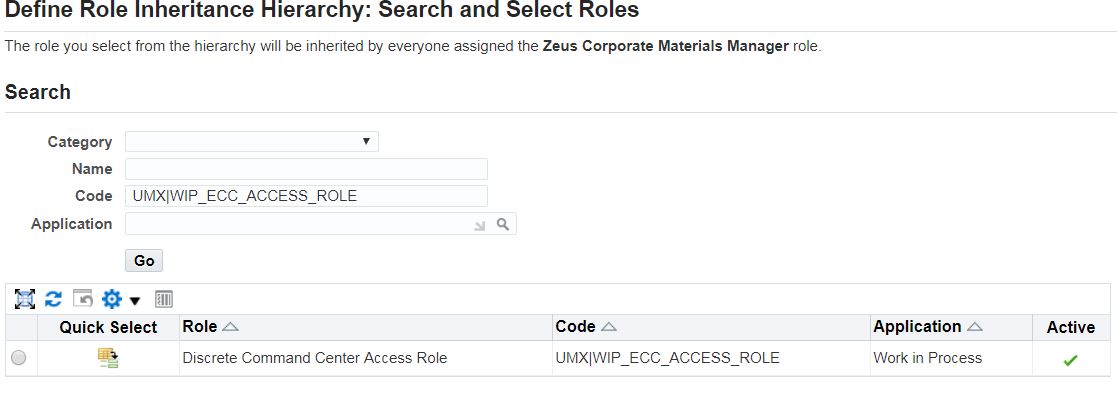

Give above responsibility Access Permission to WIP ECC Access Permission Set


Apply
Now Zeus Corporate Matierials Manager has access to “UMX|WIP_ECC_ACCESS_ROLE”.

By doing this manually, you can actually understand how Responsibility can have access to a Role.
Another easier way is to create rbaWIP.csv
PERMISSION_SET_CODE,RESPONSIBILITY_CODE,ENDECA_ROLE_CODE
WIP_ECC_ACCESS_PERM_SET,FND_RESP|FND|ZEUS_CORPORATE_MATERIALS_MGR|STANDARD,UMX|WIP_ECC_ACCESS_ROLE
then run /u02/apptest/fs1/EBSapps/appl/fnd/12.0.0/bin/UMX_ENDECA_RBACAuto.sh
 Oracle Journey
Hello,
I installed ECC V8 on EBS 12.2.11 and wanted to add ECC menus to custom responsibilities. Since its more than 800 responsibilities I opted for using the RBACAuto.sh script. I fed it the .csv file as per the oracle ECC note .It ran successfully. I added menus for all responsibilities. but i still get a similar message for the ecc menus for all the responsibilities in question “You are not authorized to access the function AP_ECC_SUPP_BALANCE.”
can you help me figure this out ?
Kind regards.
LikeLike
I run into something similar with different ECC menu. It’s been a while since I muck around in ECC so you’ll have to forgave me. Here is one thing you can try.
“You are not authorized to access the function WIP_ECC_PS. Please contact your System Administrator.” <– my original issue
In EBS, under Roles & Roles Inheritance", I look up this particular role "UMX|WIP_ECC_ACCESS_ROLE". Explicitly grant that to the EBS responsibilities that I need to use to access this ECC function.
LikeLike