
Build dataguard Standby instance from Primary database
Primary
SQL> SELECT log_mode FROM v$database;LOG_MODE------------ARCHIVELOG
Create standby redo logs on the primary database (in case of switchovers). The standby redo logs should be at least as big as the largest online redo log and there should be one extra group per thread compared the online redo logs.ALTER DATABASE FORCE LOGGING*ERROR at line 1:ORA-12920: database is already in force logging mode
SQL> ALTER SYSTEM SWITCH LOGFILE;
Create standby redo logs on the primary database (in case of switchovers). The standby redo logs should be at least as big as the largest online redo log and there should be one extra group per thread compared the online redo logs.
ALTER DATABASE ADD STANDBY LOGFILE ('/u04/apptest/testdata/standby_redo01.log') SIZE 50M ;
ALTER DATABASE ADD STANDBY LOGFILE ('/u04/apptest/testdata/standby_redo02.log') SIZE 50M ;
ALTER DATABASE ADD STANDBY LOGFILE ('/u04/apptest/testdata/standby_redo03.log') SIZE 50M ;
ALTER DATABASE ADD STANDBY LOGFILE ('/u04/apptest/testdata/standby_redo04.log') SIZE 50M ;
alter system set log_archive_config='DG_CONFIG=(TESTDG,TEST)' scope=both;
Oracle Database Appliance Setup
create database home
odacli create-dbhome -v <version number 12.1.0.2.180116>
create “shell” database
odacli create-database -n TESTCOLA -cl OLTP -s odb16 -dh 026d2dbc-ff64-4da4-873e-2c44840ac732 -y RACONE -r ACFS -m
Note! Creating RacOne node database on ACFS file system
Create some directories for multiplexing control files
mkdir -p /u02/app/oracle/oradata/TESTCOLA/controlfile
mkdir -p /u03/app/oracle/fast_recovery_area/TESTCOLA/controlfile/
mkdir -p /u04/app/oracle/redo/TESTCOLA/controlfile/
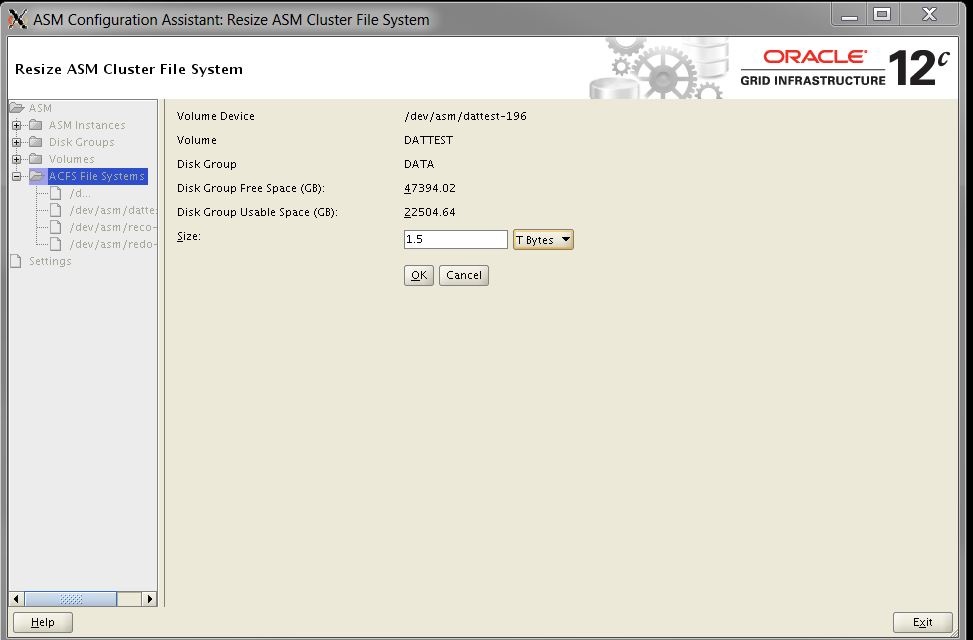
Optional: Resize ACFS file systems where datafiles will reside
Create TNS_ADMIN directory
mkdir -p /u01/app/oracle/product/12.1.0.2/dbhome_24/network/admin/TESTCOLA_1_zsc-oda0-0
export TNS_ADMIN=/u01/app/oracle/product/12.1.0.2/dbhome_24/network/admin/TESTCOLA_1_zsc-oda0-0
Source Database (Primary)
Primary’s tnsnames.ora or ifile contains the following entries
TEST = (DESCRIPTION=
(ADDRESS=(PROTOCOL=tcp)(HOST=primary-host)(PORT=1531))
(CONNECT_DATA=(SID=TEST))
)
TESTCOLA = (DESCRIPTION=
(ADDRESS=(PROTOCOL=tcp)(HOST=standby-host)(PORT=1531))
(CONNECT_DATA=(SID=TESTCOLA))
)
Primary’s listener.ora
TEST =
(DESCRIPTION_LIST =
(DESCRIPTION =
(GLOBAL_DBNAME = TEST_DGMGRL.FQDN)
(ADDRESS = (PROTOCOL = TCP)(HOST = primary-host)(PORT = 1531))
)
)
SID_LIST_TEST =
(SID_LIST =
(SID_DESC =
(ORACLE_HOME= /u01/apptest/oracle/testdb/12.1.0.2)
(SID_NAME = TEST)
)
)
lsnrctl reload TEST (Primary)
Target Database (Standby)
Standby’s tnsnames.ora or ifile contains the following entries
TEST = (DESCRIPTION=
(ADDRESS=(PROTOCOL=tcp)(HOST=primary-host)(PORT=1531))
(CONNECT_DATA=(SID=TEST))
)
TESTCOLA = (DESCRIPTION=
(ADDRESS=(PROTOCOL=tcp)(HOST=standby-host)(PORT=1531))
(CONNECT_DATA=(SID=TESTCOLA))
)
Standby’s listener.ora
SID_LIST_TESTCOLA =
(SID_LIST =
(SID_DESC =
(GLOBAL_DBNAME = TESTCOLA_DGMGRL.FQDN)
(ORACLE_HOME = /u01/app/oracle/product/12.1.0.2/dbhome_24)
(SID_NAME = TESTCOLA)
)
)
TESTCOLA =
(DESCRIPTION =
(ADDRESS = (PROTOCOL = TCP)(HOST = standby-host)(PORT = 1531))
)
ensure you can tnsping source database (TEST single instance) from target (TESTCOLA)
ensure you can tnsping target database (TESTCOLA single instance) from source (TEST)
scp password files from Primary to Standby
Since we use odacli to create TESTCOLA, remove the existing “useless” datafiles from
/u02/app/oracle/oradata/TESTCOLA/TESTCOLA/datafile/
/u03/app/oracle/fast_recovery_area/TESTCOLA/archivelog
/u04/app/oracle/redo/TESTCOLA/onlinelog
Mesh the init parameters from Primary and odacli created Standby, then create spfile from the “mesh” version of pfile with parameter (STANDBY database)*.cluster_database=FALSE
. oraenv TESTCOLA
export ORACLE_SID=TESTCOLA (built the Standby as single instance)
startup nomount
rman auxiliary sys/<standby password>@TESTCOLA target sys/<primary password>@TEST
SPOOL LOG TO ‘/tmp/rman_test_dupe.log’
run
{
duplicate target database for standby from active database dorecover nofilenamecheck;
}
NOTE!I’m doing duplicate target database from active database during non-peak hours
once RMAN session is completed, shutdown Standby,
startup nomount
alter database mount standby database;
Both Primary and Standby
ALTER SYSTEM SET dg_broker_start=true scope=both;
Primaryd
dgmgrl sys/think1st@TEST
create configuration ‘TEST’ as primary database is ‘TEST’ connect identifier is ‘TEST’;
add database ‘TESTCOLA’ as connect identifier is ‘TESTCOLA’ maintained as physical;
ENABLE CONFIGURATION;
show configuration;
Configuration – TESTCOLA
Protection Mode: MaxPerformance
Members:
TEST – Primary database
TESTCOLA – Physical standby database
Fast-Start Failover: DISABLED
Configuration Status:
SUCCESS (status updated 11 seconds ago)
show parameter log_archive (log_archive_dest_2 should be using service “TESTCOLA” and log_archive_dest_2_state=’enable’
set linesize 150
select inst_id,status,error from gv$archive_dest where dest_id=2;
If everything is configured correctly above query should return “VALID” and you should start seeing archivelogs landing in Standby’s archive area. /u03/app/oracle/fast_recovery_area/TEST/archivelog/<DATE>
select process,status,sequence# from v$managed_standby; (Both PRIMARY and STANDBY)
Primary LNS process and Standby MRP0 should have the same SEQUENCE#.
ALTER DATABASE RECOVER MANAGED STANDBY DATABASE CANCEL; (CANCEL current recovery)
ALTER DATABASE RECOVER MANAGED STANDBY DATABASE DISCONNECT FROM SESSION; (Terminate all active user sessions on the standby database and restart log apply services)
ALTER DATABASE OPEN READ ONLY;
PRE-SWITCHOVER-STEP
Verify that there are no large archive log gap between PRIMARY and STANDBY
STOP EBS FRONT END
Manual Switchover
Original Primary and Standby
select DB_UNIQUE_NAME,Database_role,open_mode,switchover_status from v$database;
Original Primary – TEST – SWITCHOVER_STATUS is TO STANDBY
STANDBY – TESTCOLA – SWITCHOVER_STATUS is NOT ALLOWED
Convert Primary to Standby
SQL> alter database commit to switchover to physical standby with session shutdown; (PRIMARY)
SQL> alter database commit to switchover to primary with session shutdown; (STANDBY)
set linesize 200
col DB_UNIQUE_NAME form a30
col DATABASE_ROLE for a20
col OPEN_MODE for a30
col SWITCHOVER_STATU for a30

select DB_UNIQUE_NAME,Database_role,open_mode,switchover_status from v$database;
Original Standby is now Primary
TESTCOLA – Database Role is Primary, OOPEN_MODE is mounted and SWITCHOVER_STAUTS is NOT ALLOWED
Convert Original Primary(TEST- zsc-oradev-01) to Standby
startup nomount

alter database mount standby database;

alter database recover managed standby database disconnect from session;

alter database recover managed standby database cancel;

alter database open read only;

ALTER DATABASE RECOVER MANAGED STANDBY DATABASE DISCONNECT FROM SESSION; (Real-time apply)
Once media recovery process is finish in (TESTCOLA -standby-host)
select process,status,sequence# from v$managed_standby;
TESTCOLA@standby-host should not have any more MRP0 process running
alter database open;
Single Instance to RAC-One Conversion
since newly minted PRIMARY on standby-host is single instance, convert it to RAC-One (RAC)
EXEC DBMS_STATS.gather_system_stats;
alter system set cluster_database=true scope=spfile;
create undo tablespace APPS_UNDOTS2;
alter system set undo_tablespace='APPS_UNDOTS1' sid='TESTCOLA_1' scope=spfile;
alter system set undo_tablespace='APPS_UNDOTS2' sid='TESTCOLA_2' scope=spfile;
alter system set thread=1 sid='TESTCOLA_1' scope=spfile;
alter system set thread=2 sid='TESTCOLA_2' scope=spfile;
Create Online logs for Thread 2
set echo off
set feedback off
set linesize 120
set pagesize 35
set trim on
set trims on
set lines 120
col group# format 999
col thread# format 999
col member format a60 wrap
col status format a10
col archived format a10
col fsize format 999 heading "Size (MB)"
select l.group#, l.thread#,f.member,l.archived, l.status, (bytes/1024/1024) fsize from v$log l, v$logfile f where f.group# = l.group# order by 1,2;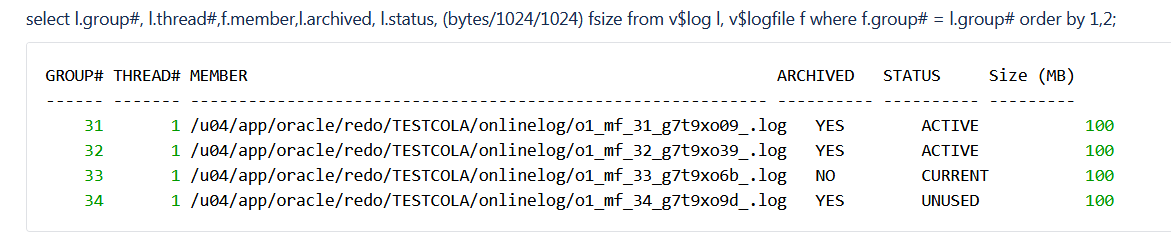
alter database add logfile thread 2 group 35;
alter database add logfile thread 2 group 36;
alter database add logfile thread 2 group 37;
alter database add logfile thread 2 group 38;
alter database enable thread 2;
shutdown single instance TESTCOLA
export ORACLE_SID=TESTCOLA_1
ENSURE $TNS_ADMIN is point to $ORACLE_HOME/network/admin/TESTCOLA_1_standby-host and TESTCOLA_LOCAL alias exists inside tnsnames.ora
TESTCOLA_LOCAL=(DESCRIPTION=(ADDRESS=(PROTOCOL=tcp)(HOST=standby-host-0)(PORT=1531)))
Only for RAC-ONE
STOP TESTCOLA_1 on node 0
OTHER NODE aka node 1(standby-host-1)
add the following entry to /etc/oratab
TESTCOLA:/u01/app/oracle/product/12.1.0.2/dbhome_24:N
export ORACLE_SID=TESTCOLA_2
mkdir -p /u01/app/oracle/product/12.1.0.2/dbhome_24/network/admin/TESTCOLA_2_standby-host-1
export TNS_ADMIN=/u01/app/oracle/product/12.1.0.2/dbhome_24/network/admin/TESTCOLA_2_standby-host-1
cd $TNS_ADMIN
easiest way is to scp $TNS_ADMIN directory from standby-host-0 to standby-host-1 and change the host-name in tnsnames.ora and listener.ora
lsnrctl start TESTCOLA
mkdir -p /u01/app/oracle/admin/TESTCOLA/adump
sqlplus / as sysdba
startup (sanity check) (show parameter instance)
EBS configuration (database tier)
EBS Front-End
cp /u02/apptest/fs1/inst/apps/TEST_frontend-host/appl/admin/TEST_frontend-host.xml /u02/apptest/fs1/inst/apps/TEST_frontend-host/appl/admin/TEST_frontend-host.xml.preODA (backup APPS CONTEXT_FILE)
perl /u02/apptest/fs1/EBSapps/appl/ad/12.0.0/bin/admkappsutil.pl

Node 0 (TESTCOLA_1 is running)
sqlplus / as sysdba
startup
scp appsutil.zip
scp oratest@frontend-host:/u02/apptest/fs1/inst/apps/TEST_frontend-host/admin/out/appsutil.zip /u01/app/oracle/product/12.1.0.2/dbhome_24/.
Node 0 (standby-host-0)
vi $TNS_ADMIN/tnsnames.ora
TEST =
  (DESCRIPTION =
    (ADDRESS = (PROTOCOL = TCP)(HOST = original-primary-host)(PORT = 1531))
    (CONNECT_DATA =
      (SERVER = DEDICATED)
      (SID = TEST)
    )
  )
TESTCOLA_LOCAL=
        (DESCRIPTION=
                (ADDRESS=(PROTOCOL=tcp)(HOST=standby-host-0)(PORT=1531))
        )
TESTCOLA_1_LOCAL=
        (DESCRIPTION=
                (ADDRESS=(PROTOCOL=tcp)(HOST=standby-host-0)(PORT=1531))
        )
TESTCOLA_REMOTE=
        (DESCRIPTION=
            (ADDRESS_LIST=
                (ADDRESS=(PROTOCOL=tcp)(HOST=scan-ip-address1)(PORT=1521))
                (ADDRESS=(PROTOCOL=tcp)(HOST=scan-ip-address2)(PORT=1521))
            )
        )
TESTCOLA =
  (DESCRIPTION =
    (ADDRESS = (PROTOCOL = TCP)(HOST = standby-host-0)(PORT = 1531))
    (CONNECT_DATA =
      (SERVER = DEDICATED)
      (SID = TESTCOLA)
    )
  )
alter system set remote_listener='TESTCOLA_REMOTE' scope=both sid='*';
alter system set local_listener='TESTCOLA_1_LOCAL' sid='TESTCOLA_1' scope=both;At this point TESTCOLA listener and LISTENER_SCAN1/2 should have all the database services registered.
cd $ORACLE_HOME
unzip -o appsutil.zip
cd $ORACLE_HOME/appsutil
sqlplus apps
exec fnd_conc_clone.setup_clean;  (truncate applsys.FND_OAM_CONTEXT_FILES)
Ensure jre directory exists under $ORACLE_HOME/appsutil
if not, tar -xvzf jre-<version>-linux-x64.tar.gz
and create symbolic link ln -s jre-<version>-linux-x64.tar.gz/ jre
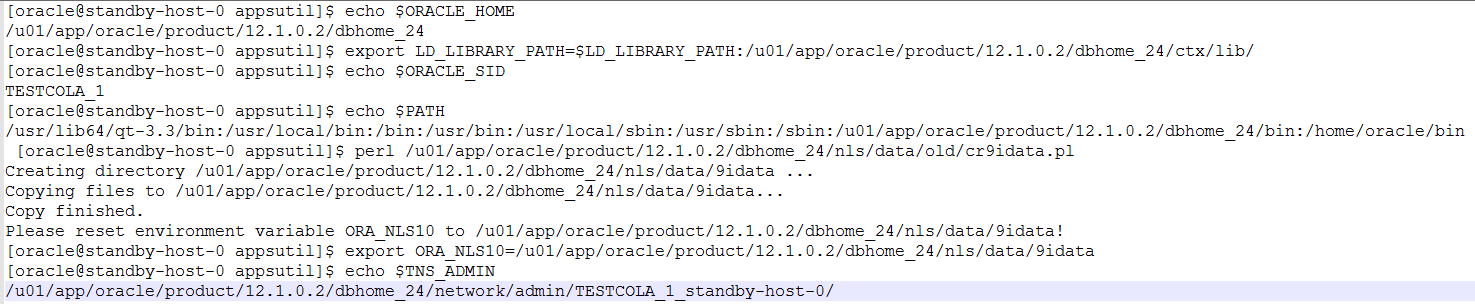
Ensure Following environment variables are set
cd $TNS_ADMIN
[oracle@standby-host-0 TESTCOLA_1_standby-host-0]$ cp listener.ora listener.ora.bak
lsnrctl stop TESTCOLA
vi listener.ora (SID: add _1)
lsnrctl start TESTCOLA
cd /u01/app/oracle/product/12.1.0.2/dbhome_24/appsutil/bin
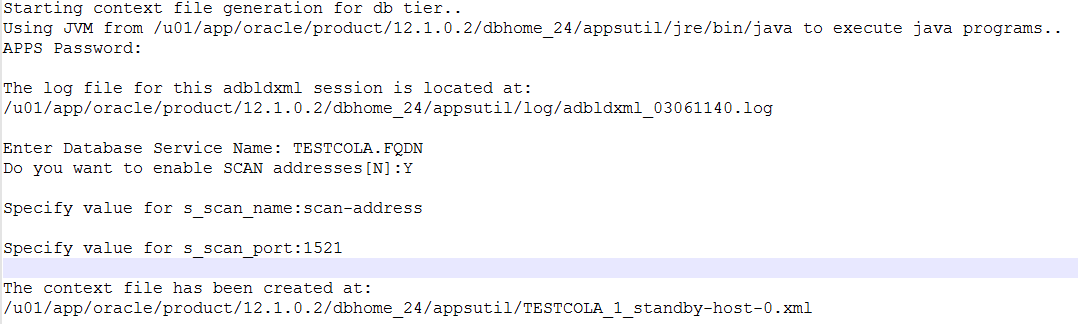
perl /u01/app/oracle/product/12.1.0.2/dbhome_24/appsutil/bin/adbldxml.pl
vi $TNS_ADMIN/sqlnet.ora (add the following)

vi /u01/app/oracle/product/12.1.0.2/dbhome_24/appsutil/TESTCOLA_1_standby-host-0.xml

Run adconfig.sh
[oracle@standby-host-0 bin]$ /u01/app/oracle/product/12.1.0.2/dbhome_24/appsutil/bin/adconfig.sh
Enter the full path to the Context file: /u01/app/oracle/product/12.1.0.2/dbhome_24/appsutil/TESTCOLA_1_standby-host-0.xml
EVEN though initial adconfig run successfully, $CONTEXT_FILE parameter s_update_scan is now set to “FALSE”.
Result of this, remote_listener prameter under $TNS_ADMIN get override to standby-host-0-vip instead of two scan ip addresses
vi /u01/app/oracle/product/12.1.0.2/dbhome_24/appsutil/TESTCOLA_1_standby-host-0.xml
<scanUpdateFlag oa_var="s_update_scan">TRUE</scanUpdateFlag>
If the database services are still registered with scan listeners, change the tnsnames.ora as below and rerun adconfig
TEST_REMOTE=
        (DESCRIPTION=
            (ADDRESS_LIST=
                (ADDRESS=(PROTOCOL=tcp)(HOST=scan-ip-address-1)(PORT=1521))
                (ADDRESS=(PROTOCOL=tcp)(HOST=scan-ip-address-2)(PORT=1521))
            )
        )
Node 1 EBS listener Configuration
node 1 EBS listener Configuration will be the same as Node 0, the only changes should be made are references to standby-host-0 to standby host-1 and TESTCOLA_2_LOCAL alias under tnsnames.ora
alter system set local_listener='TESTCOLA_2_LOCAL' sid='TESTCOLA_2' scope=both;Node 0 (Register database listener with clusterware)
[oracle@standby-host-0 TEST_1_standby-host-0]$ srvctl add listener -l TESTCOLA_LISTENER -o /u01/app/oracle/product/12.1.0.2/dbhome_24 -p 1531
[oracle@standby-host-0 TEST_1_standby-host-0]$ srvctl setenv listener -l TESTCOLA_LISTENER -T TNS_ADMIN=/u01/app/oracle/product/12.1.0.2/dbhome_24/network/admin
create following IFILEs under $ORACLE_HOME/network/admin  (Both nodes).
create following IFILEs under $ORACLE_HOME/network/admin
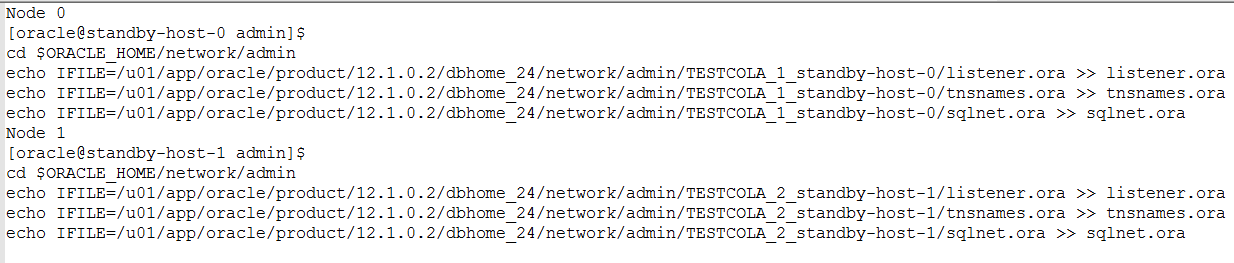

Sanity Check

EBS configuration (Application tier)
Edit $CONTEXT_FILE
<jdbc_url oa_var="s_apps_jdbc_connect_descriptor">jdbc:oracle:thin:@(DESCRIPTION=(ADDRESS_LIST=(LOAD_BALANCE=YES)(FAILOVER=YES)(ADDRESS=(PROTOCOL=tcp)(HOST=scan-address-name)(PORT=1521)))(CONNECT_DATA=(SERVICE_NAME=TESTCOLA.zeusinc.com)))</jdbc_url>

<patch_jdbc_url oa_var="s_apps_jdbc_patch_connect_descriptor">jdbc:oracle:thin:@(DESCRIPTION=(ADDRESS=(PROTOCOL=tcp)(HOST=scan-address-name)(PORT=1521))(CONNECT_DATA=(SERVICE_NAME=TESTCOLA_ebs_patch.zeusinc.com)(INSTANCE_NAME=TESTCOLA_1)))</patch_jdbc_url>

<dbhost oa_var="s_dbhost">scan-address-name</dbhost>

<cmanhost oa_var="s_cmanhost">scan-address-name</cmanhost>

<dbport oa_var="s_dbport" oa_type="EXT_PORT" base="1521" step="1" range="-1" label="Database Port">1521</dbport>

<cmanport oa_var="s_cmanport" label="Oracle Connection Manager Port">1521</cmanport>

<TWO_TASK oa_var="s_tools_twotask" osd="unix">TESTCOLA</TWO_TASK>

<CP_TWOTASK oa_var="s_cp_twotask">TESTCOLA</CP_TWOTASK>

<TWO_TASK oa_var="s_weboh_twotask" osd="unix">TESTCOLA</TWO_TASK>
Front End tnsnames.ora
Change tnslias for current $TWO_TASK parameter so that front-end host can connect to TESTCOLA_1 database on standby-host-0
TESTCOLA=
        (DESCRIPTION=
                (ADDRESS=(PROTOCOL=tcp)(HOST=standby-host-0-vip.zeusinc.com)(PORT=1531))
            (CONNECT_DATA=
                (SERVICE_NAME=TESTCOLA.FQDN)
                (INSTANCE_NAME=TESTCOLA_1)
            )
        )
echo $TWO_TASK (this should point to TESTCOLA)
sqlplus apps (sanity check)
run adautocfg.sh
If adautocfg.sh finished successfully, adstrtal.sh
If adautocfg.sh finished successfully, adstrtal.sh. Front-end $TNS_ADMIN/tnsnames.ora should have new scan-ip-addresses for some of the alias that EBS uses to connect to the database
EBS patch file config
Source patch file system then follow same steps as Run file configuration
adautocfg.sh

Safely ignore Above autocfg error.

END
 Oracle Journey